
Hipay
For One-time Payments
Hipay is a subsidiary of the Mongolian Fintech Group, established in 2019, and is now the second-largest wallet in Mongolia with over 800,000 users to date. Hipay provides Mongolian users with a variety of payment services, including more than 8,000 merchants and over 100 e-commerce websites.
Properties
The following table lists the product properties supported by Hipay:
User experience
Note: The following payment flows on different terminals are reference only, and represent this payment method's flow on different terminal types. For supported merchants' terminal types, consult Antom Technical Support.
The following figures show the journey of paying with Hipay:
Web (Log in)
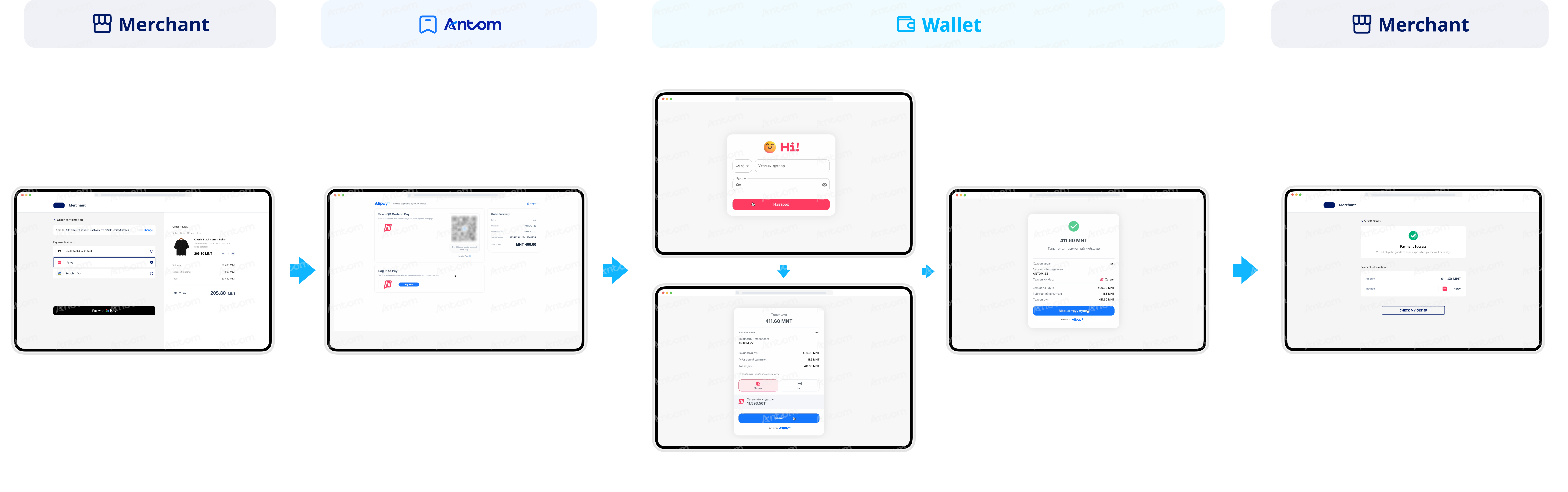
- The buyer selects Hipay to pay.
- The buyer is redirected to the Antom page, where the buyer can choose to log in to proceed with the payment.
- The buyer logs in with the phone number and password registered with Hipay.
- The buyer checks the payment details and completes mandatory authentication.
- The buyer completes the payment and receives a transaction notification.
- The buyer is redirected back to the merchant result page.
Web (Code scanning)
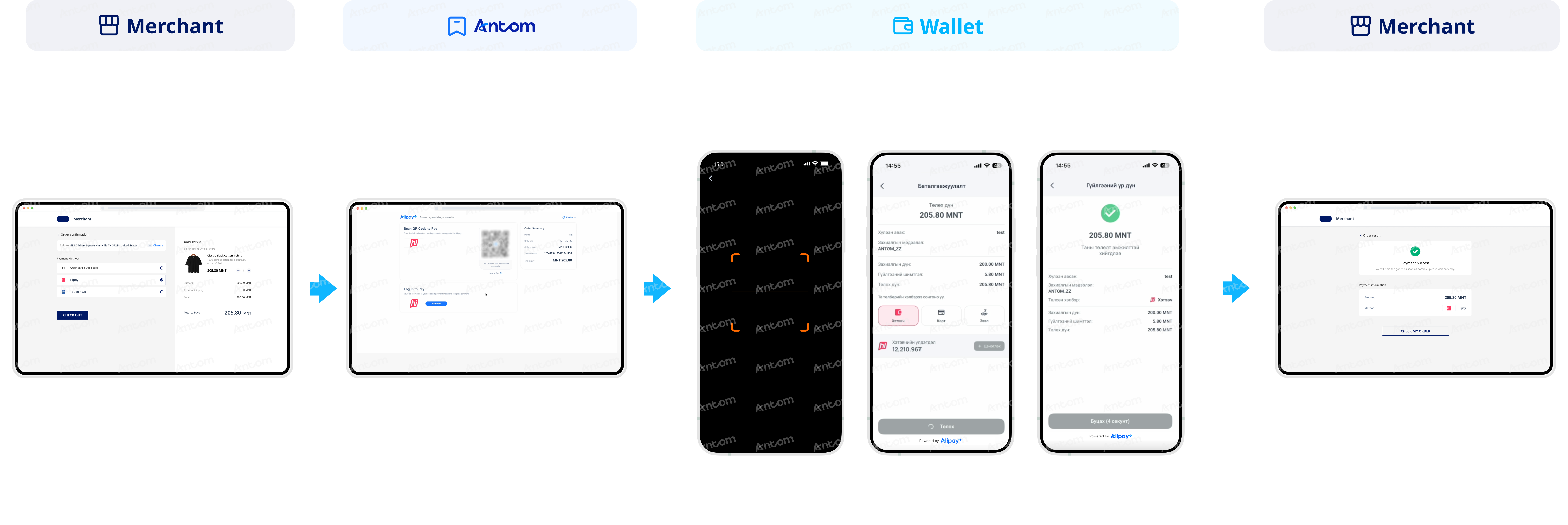
- The buyer selects Hipay to pay.
- The buyer is redirected to the Antom page, where a generated QR code is displayed.
- The buyer opens the Hipay app to scan the QR code.
- The buyer checks the payment details and completes mandatory authentication.
- The buyer completes the payment and receives a transaction notification.
- The buyer is redirected back to the merchant result page.
App
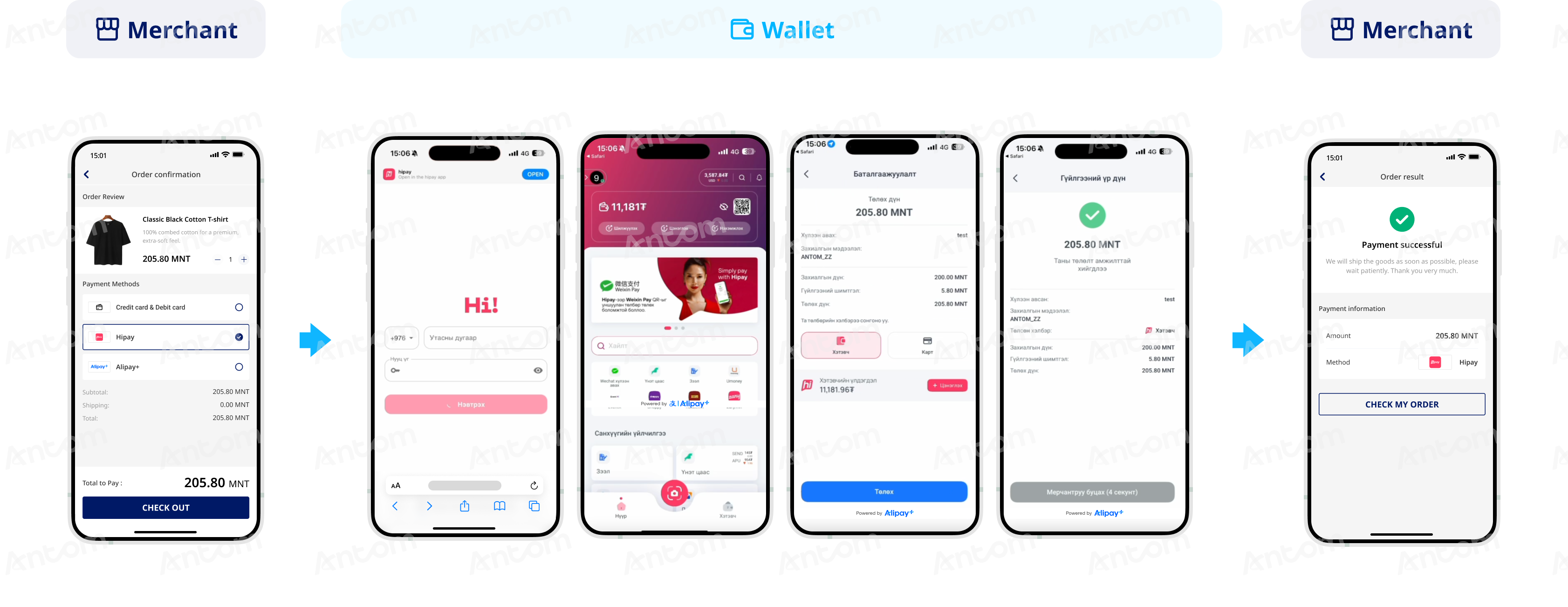
- The buyer selects Hipay to pay.
- The buyer is redirected to the Hipay browser page and clicks OPEN to proceed with the payment.
- The buyer is redirected to the Hipay app and turns to the order payment page.
- The buyer checks the payment details and completes mandatory authentication.
- The buyer completes the payment and receives a transaction notification.
- The buyer is redirected back to the merchant result page.
WAP
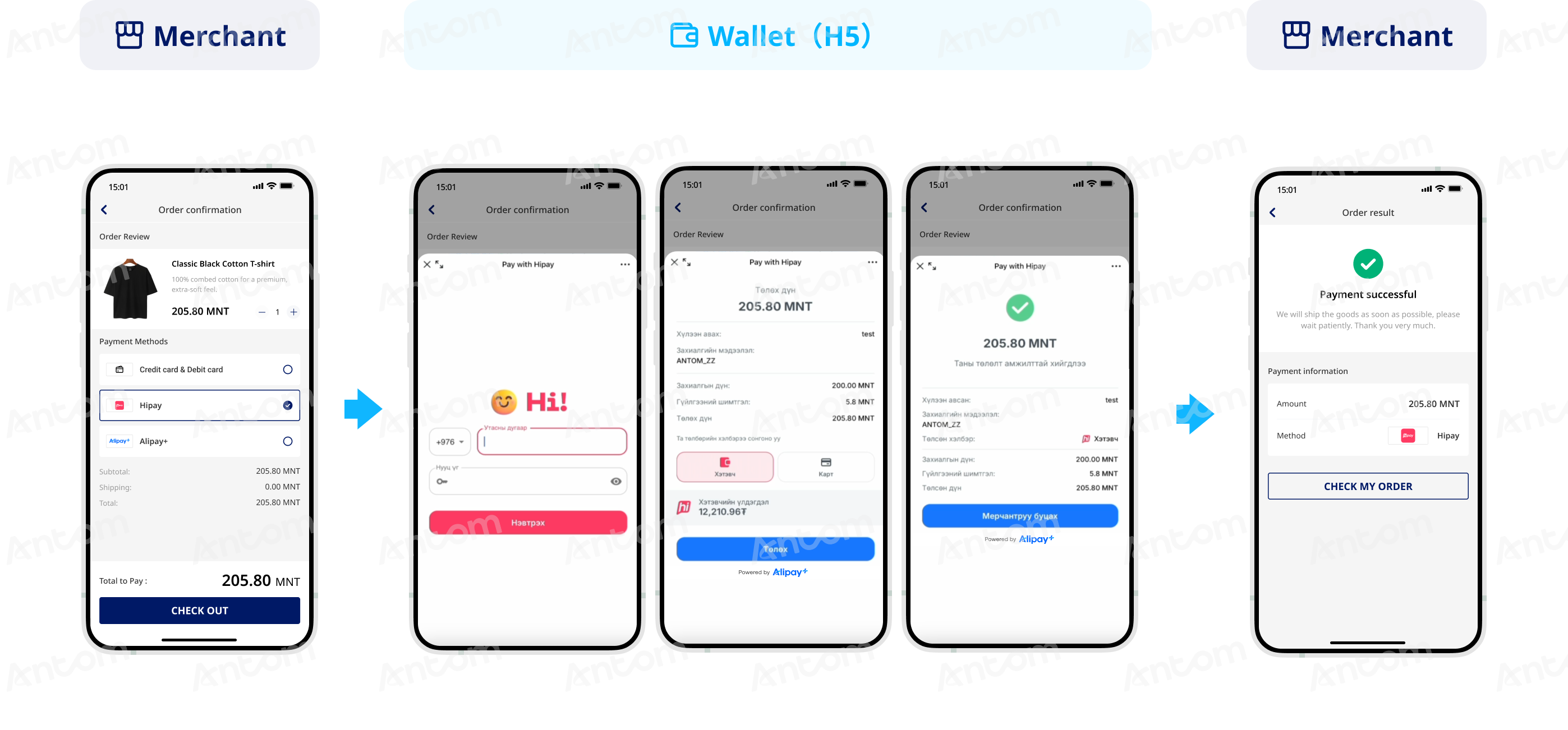
- The buyer selects Hipay to pay.
- The buyer is redirected to the Hipay H5 page to log in with the Hipay account.
- The buyer checks the payment details and completes mandatory authentication.
- The buyer completes the payment and receives a transaction notification.
- The buyer is redirected back to the merchant result page.
For Tokenized Payment
Hipay is a subsidiary of the Mongolian Fintech Group, established in 2019, and is now the second-largest wallet in Mongolia with over 800,000 users to date. Hipay provides Mongolian users with a variety of payment services, including more than 8,000 merchants and over 100 e-commerce websites.
Properties
The following table lists the product properties supported by Hipay:
User experience
The following figures show the Hipay authorization process:
Web
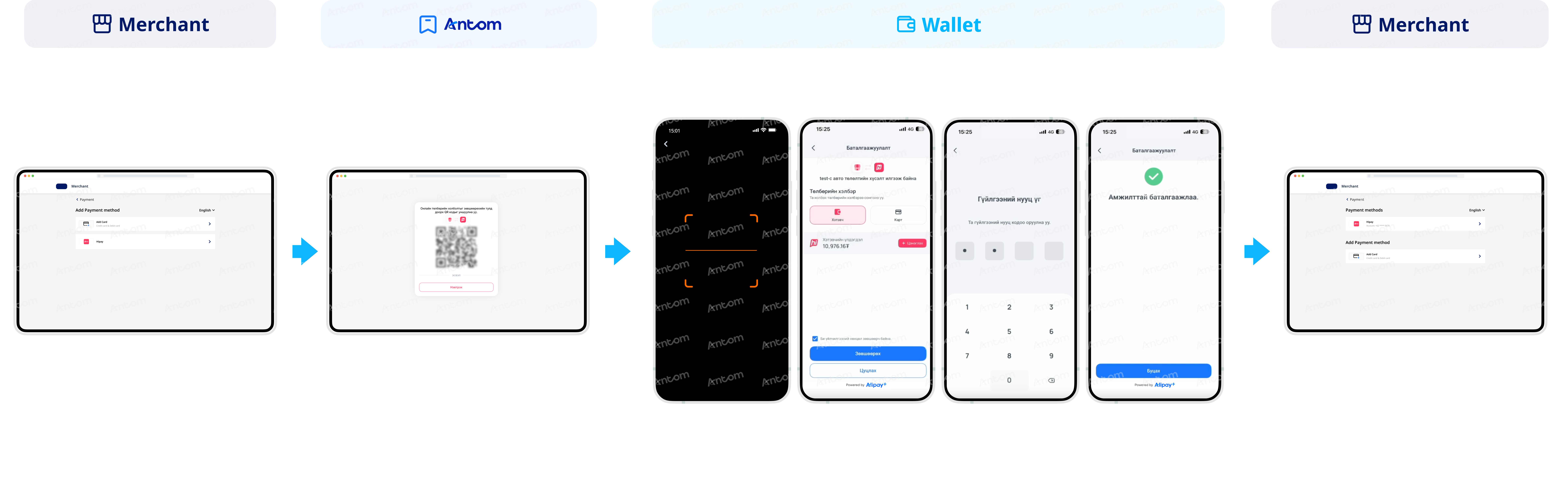
- The buyer selects Hipay to bind.
- The buyer is redirected to the Antom page, where a generated QR code is displayed.
- The buyer opens the Hipay app to scan the QR code.
- The buyer is redirected to the automatic payment service agreement signing page and checks the box to confirm the agreement and signing.
- The buyer enters the transaction password.
- The buyer completes the signing.
- The buyer is redirected to the merchant page to check the binding account information.
App
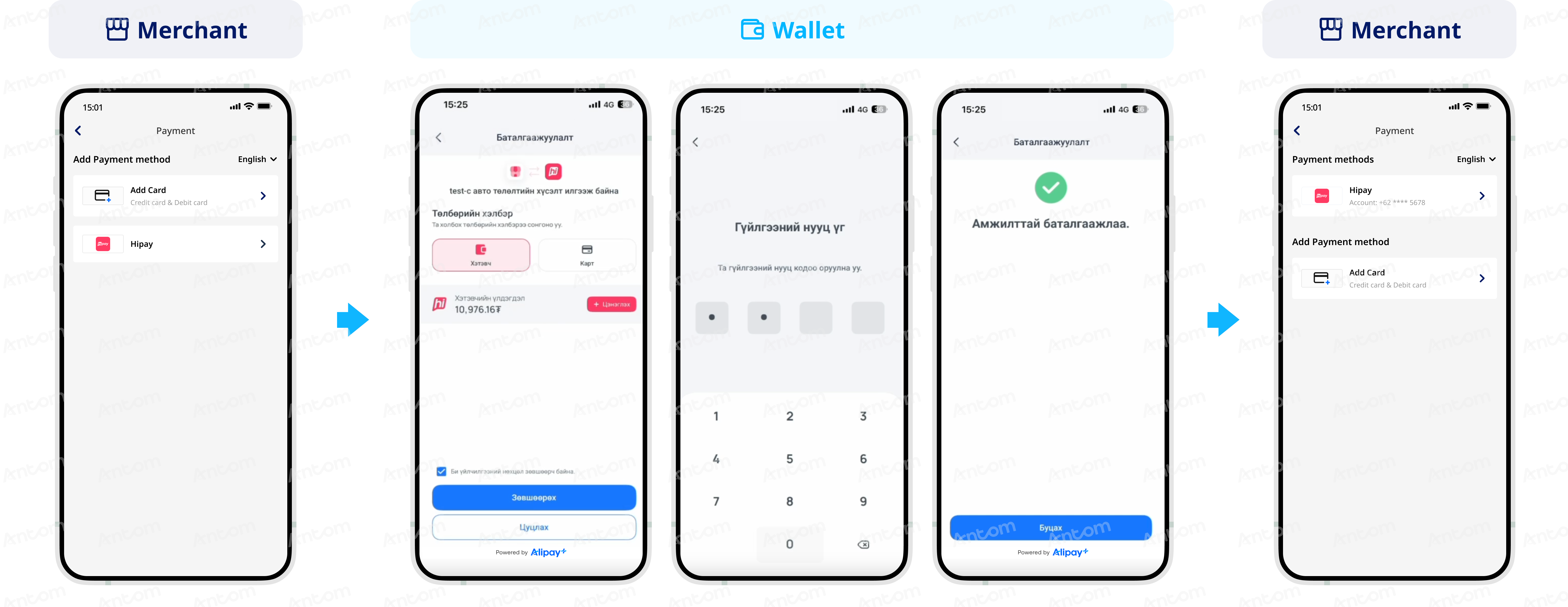
- The buyer selects Hipay to bind.
- The buyer is redirected to the Hipay app and checks the box to confirm the agreement and signing in the payment service agreement signing page.
- The buyer enters the transaction password.
- The buyer completes the signing.
- The buyer is redirected to the merchant page to check the binding account information.
Supported online payment integrations
Antom offers a range of integration options tailored to each payment method. Each payment method may support different online payment integration options, allowing for flexibility based on your business requirements. The table below provides detailed information about the specific integrations available for each payment method: