
QRPH
QRPH is the QR code standard of the Philippines. It is convenient, secure, and cost-effectiveness, offering a single, standardized QR code for diverse bank or e-wallet payments in the Philippines. QRPH creates a secure, interconnected, cashless system for easier person-to-person (P2P) and person-to-merchant (P2M) transactions.
Properties
The following table lists the product properties supported by QRPH:
Payment type | Real-time payment | ||
Acquirer | AntomSG, AntomHK, AntomEU, AntomUS, AntomUK, AntomPH | Merchant entity location | SG, HK, EEA, US, UK, PH |
Payment flow | Code-scanning | Refund | ❌ |
Buyer country/region | Philippines | Partial refund | ❌ |
Processing currency | PHP | Chargeback/Dispute | ✔️ |
Minimum payment amount | 20 PHP | Refund period | ❌ |
Maximum payment amount | 9,999,999 PHP | Time to return payment result | Real-time |
Default timeout | 14 minutes | ||
User experience
Note: The following payment flows on different terminals are reference only, and represent this payment method's flow on different terminal types. For supported merchants' terminal types, consult Antom Technical Support.
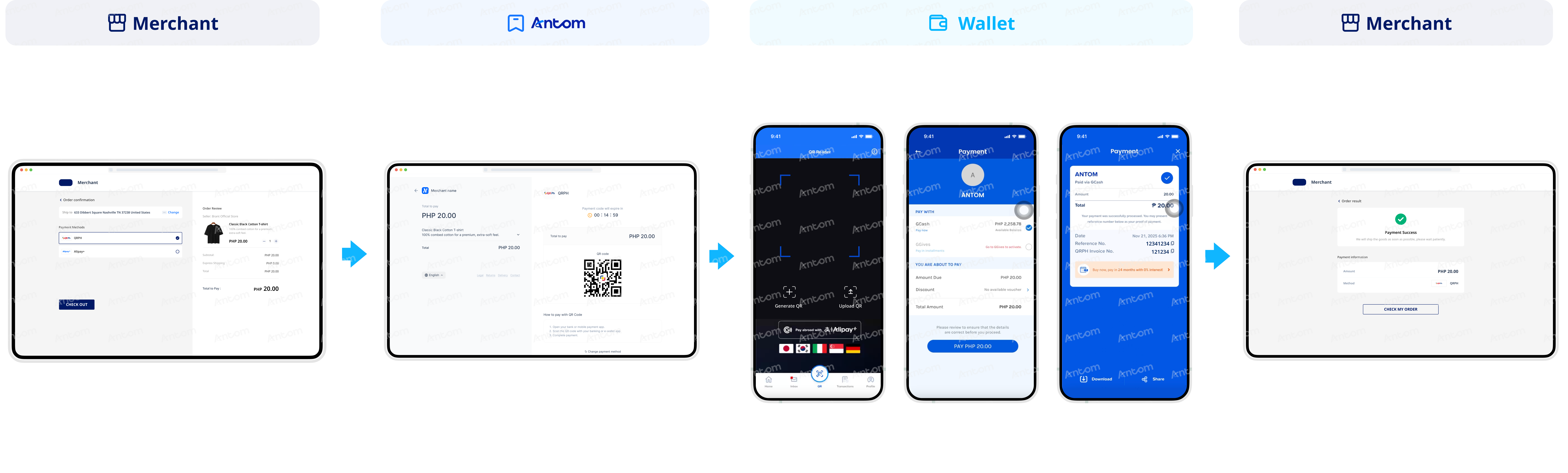
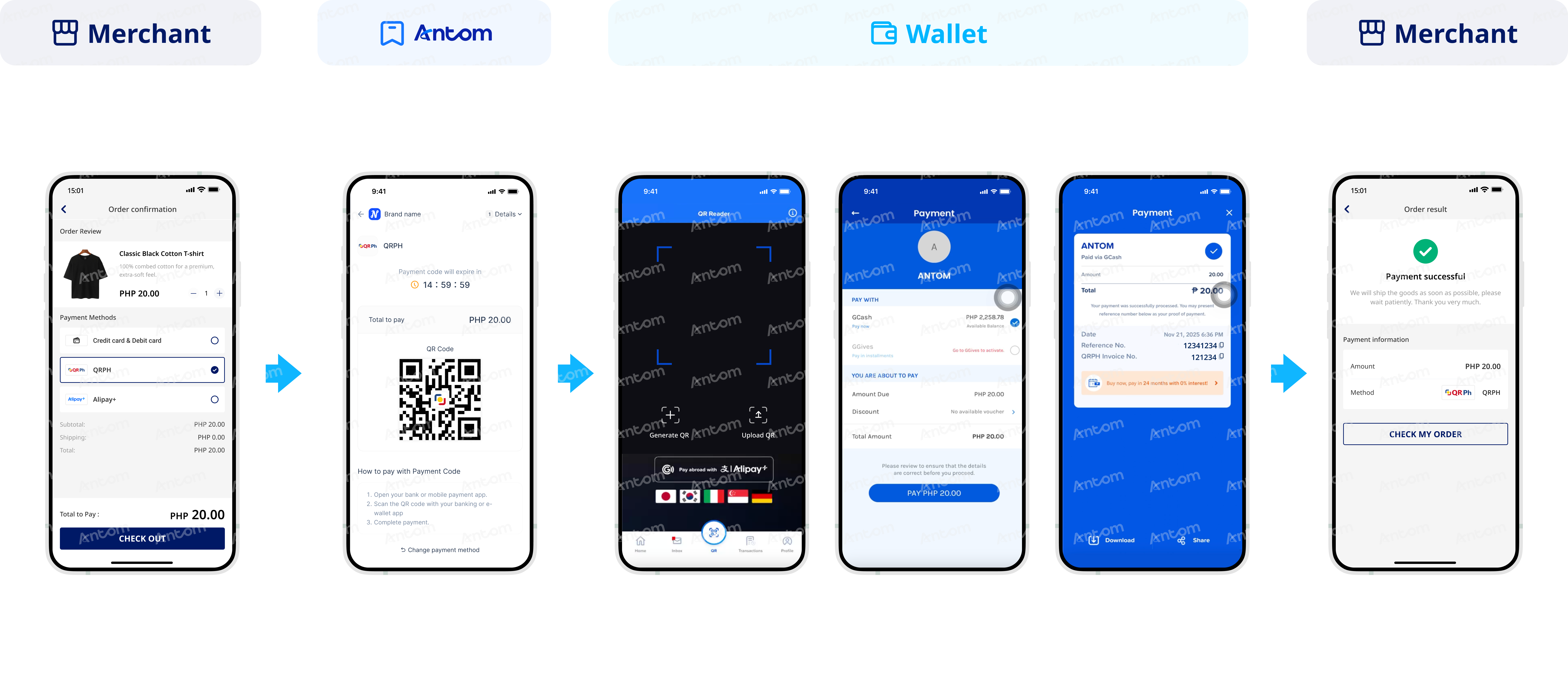
The following figures show the journey of paying with QRPH:
Web
App
Supported online payment integrations
Antom offers a range of integration options tailored to each payment method. Each payment method may support different online payment integration options, allowing for flexibility based on your business requirements. The table below provides detailed information about the specific integrations available for each payment method:
Supported online payments | Supported integrations |
One-time Payments | ❌ Payment links |
Tokenized Payment | ❌ |
Subscription Payment | ❌ |
EasySafePay | ❌ |
Scan to Link | ❌ |
Integration considerations
The following section outlines integration considerations for various payment types, detailing customized integration solutions and payment method features.
About normalUrl
- When accepting payments from QRPH, you can choose whether to use normalUrl:
- If choosing not to use normalUrl, you can directly render the codeValue in the API response on the merchant page to display the QR code, reducing page redirections and improving the payment experience.
- If choosing to use normalUrl, redirect your buyer to the address specified by normalUrl and proceed the payment process as indicated in User experience.
- For Web, WAP, and App terminals, normalUrl is returned in the response of the pay (One-time Payments) API. The buyer is redirected to the address specified by normalUrl and uses the QR code displayed on the page to proceed with the payment. The buyer completes the payment by scanning the code on the mobile phone, and the middle page automatically redirects to the merchant result page.
- Different terminal types have specific integration features when returning normalUrl.
- WAP: The returned normalUrl is the QR code and payment operation display page. The buyer takes a screenshot of the QR code first, and manually opens the specific payment method app to scan and pay.
- App: The returned normalUrl does not trigger the payment method app. It is recommended to open the redirection URL outside of the application.
After payments
- After the buyer completes the payment in the bank app, the bank app will not automatically redirect to the merchant's results page. The buyer needs to manually navigate to the transaction initiation app (the merchant app or browser).
- This payment method does not support refunds. It is recommended to communicate directly with the buyer offline.
- Obtain the payment result from the payment result notification (notifyPayment) or by making inquiries (inquiryPayment). Handle the redirection and display of the payment result page to avoid duplicate payments.
Default timeout
- This payment method can specify the QR code expiration time from 60 sec to 9,000 sec. The transaction expiration time follows the QR Code expiration time.
- When displaying the QR code, use the expireTime parameter value returned in the pay (One-time Payments) API response to display the timeout information.
- Before the order closing time, when the merchant closes the order, the buyer is still able to complete the payment, leading to potential payment discrepancies.
Response sample
The following is a code example in the payment response: