
Boost
For One-time Payments, Subscription Payment
Boost was founded in 2017 by Axiata, which is a well-known telecom operator in Malaysia. It is one of the fastest-growing wallets for local users and also the most popular e-wallet in the local market. Users can use an app through which they can choose between a basic wallet and a premium wallet, which determines the balance limit and transaction limit.
Boost wallet provides payment services for shopping, catering, traveling, movie-watching, and more, with merchants spanning from online stores to offline stores. These also include e-commerce platforms such as Shopee and Lazada, entertainment merchants such as PlayStation, Steam, and Spotify, catering merchants such as Burger King, KFC, and Nando's, and transportation merchants such as Klia and RedBus.
Properties
The following table lists the product properties supported by Boost:
User experience
Note: The following payment flows on different terminals are reference only, and represent this payment method's flow on different terminal types. For supported merchants' terminal types, consult Antom Technical Support.
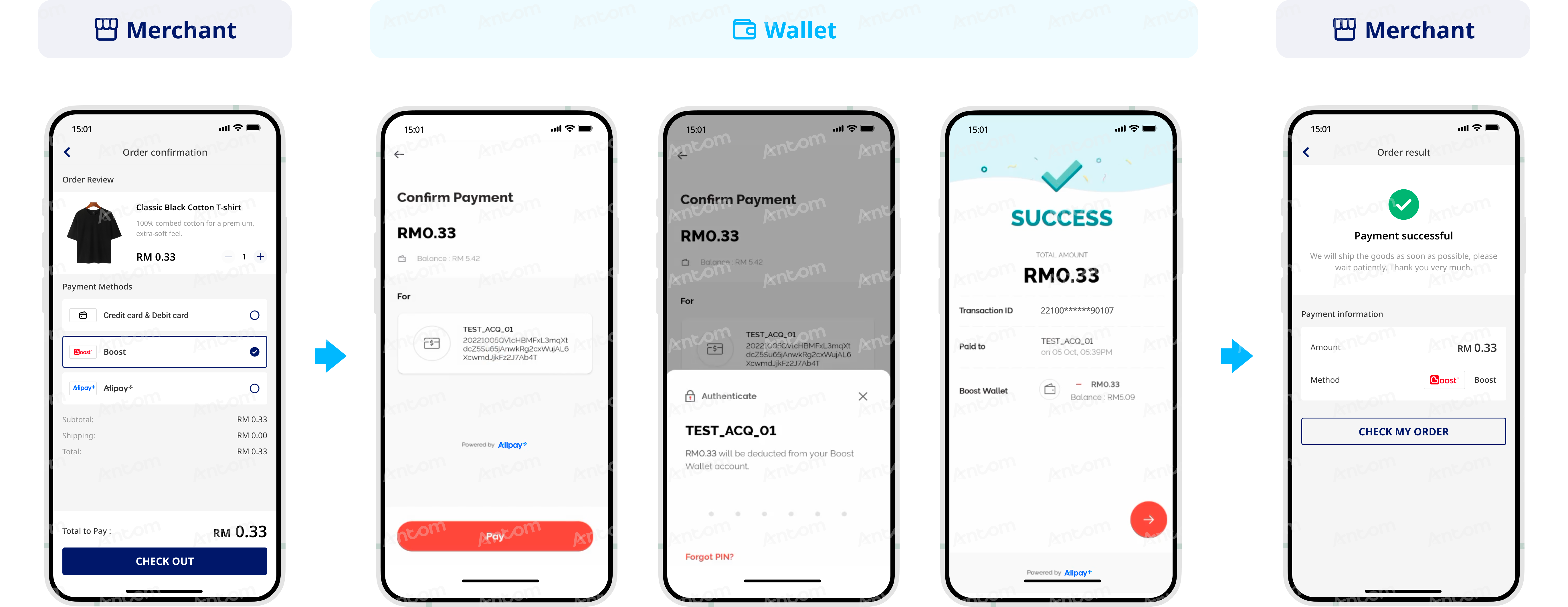
The following screenshot shows the journey of paying with Boost:
For Tokenized Payment
Boost was founded in 2017 by Axiata, which is a well-known telecom operator in Malaysia. It is one of the fastest-growing wallets for local users and also the most popular e-wallet in the local market. Users can use an app through which they can choose between a basic wallet and a premium wallet, which determines the balance limit and transaction limit.
Boost wallet provides payment services for shopping, catering, traveling, movie-watching, and more, with merchants spanning from online stores to offline stores. These also include e-commerce platforms such as Shopee and Lazada, entertainment merchants such as PlayStation, Steam, and Spotify, catering merchants such as Burger King, KFC, and Nando's, and transportation merchants such as Klia and RedBus.
Properties
The following table lists the product properties supported by Boost:
User experience
The following graphics show the Boost app authorization process:
App
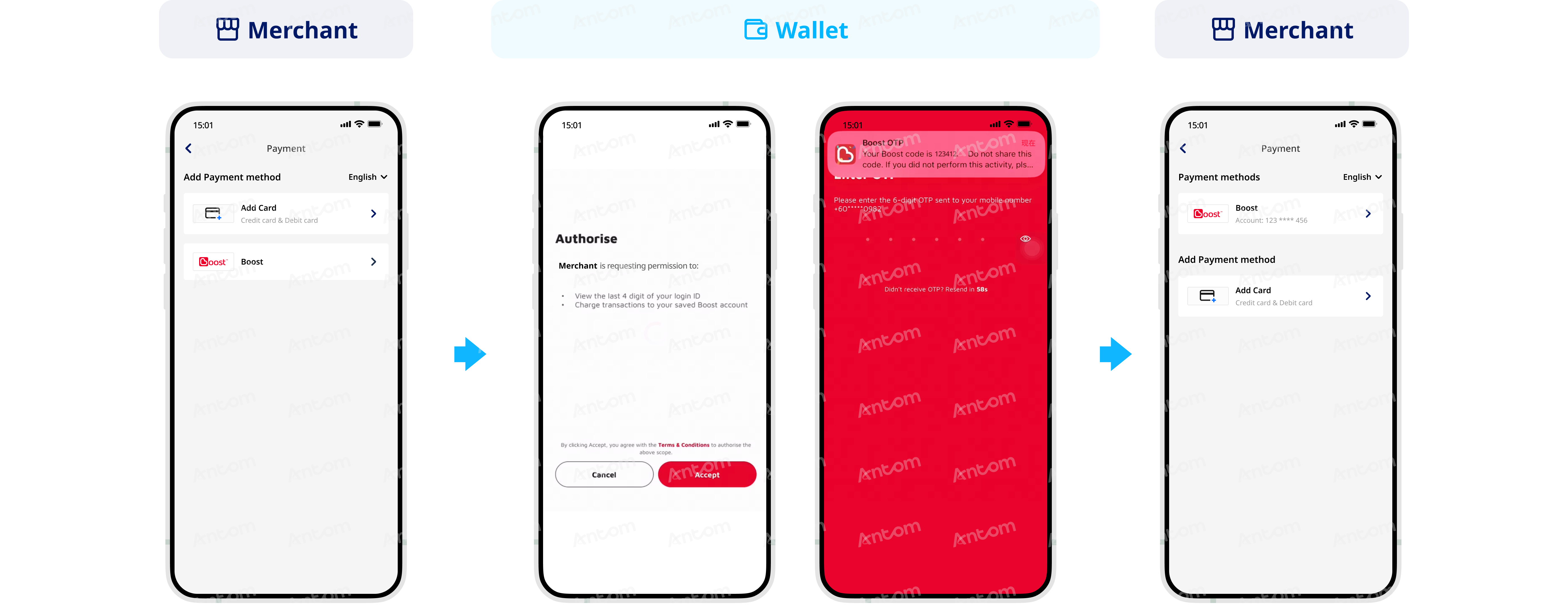
- The buyer selects Boost to bind at the merchant checkout page.
- The buyer is navigated to the Boost app to check the automatic payment service agreement signing information and clicks Accept to proceed with the authorization process.
- The buyer enters the OTP to complete signing and receives notification of authorization approval.
- The buyer is redirected to the merchant page to check the binding result.
WAP
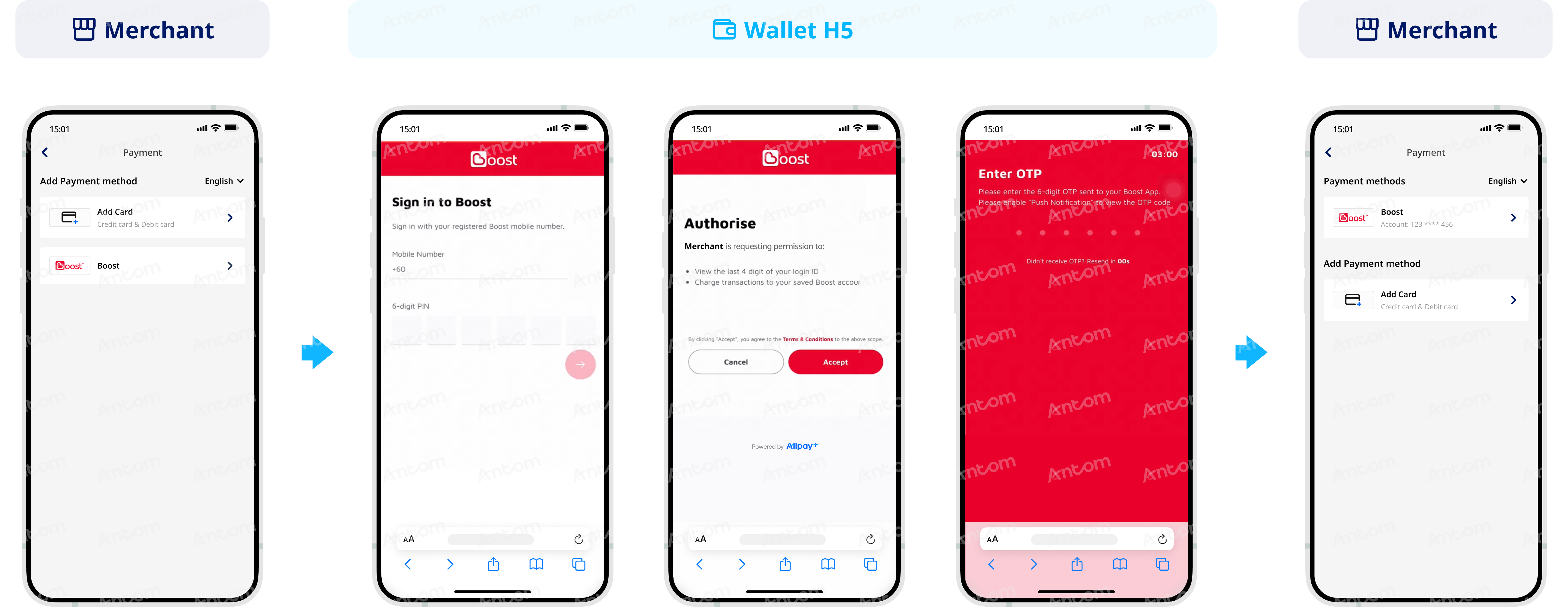
- The buyer selects Boost to bind at the merchant checkout page.
- The buyer is navigated to the Boost browser page and logs in with the mobile number and PIN.
- The buyer clicks Accept to proceed with the authorization process at the automatic payment service agreement signing page.
- The buyer enters the OTP to complete signing and receives notification of authorization approval.
- The buyer is redirected to the merchant page to check the binding result.
Supported online payment integrations
Antom offers a range of integration options tailored to each payment method. Each payment method may support different online payment integration options, allowing for flexibility based on your business requirements. The table below provides detailed information about the specific integrations available for each payment method: