
Settlement & Transactions
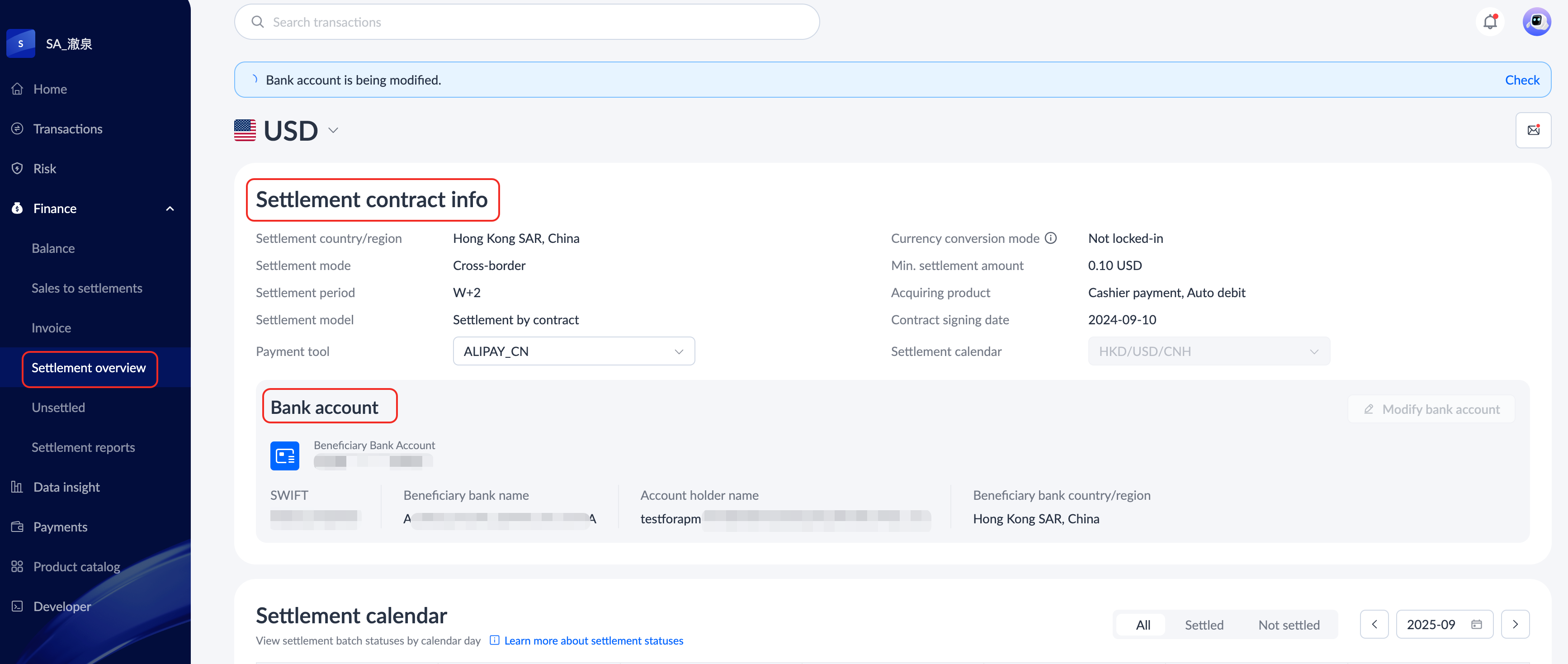
How to check my settlement capability and bank account information?
Click Finance > Settlement overview to check your settlement contract information and bank account information.
How to initiate a transaction refund?
You can initiate a transaction refund by following the steps below:
- Log in to the Antom Dashboard. Click Transactions > All transactions.
- On the All transactions page, click corresponding Transaction ID to initiate a single refund, or click Batch refund to initiate a batch refund.
For more detailed information, please refer to Refund transactions.
What changes have been made to the settlement and transaction modules after the version migration?
For details on the changes of settlement and transaction modules between the old and new Antom Dashboard versions, as well as related operational guidance for the new version, please refer to the following frequently asked questions:
- What are the differences between the new and classic versions of transaction reports?
- How to download transaction reports in the new version of Antom Dashboard?
- How to download settlement reports in the new version of Antom Dashboard?
- Are the To-be-settled details the same as the Unsettled transactions in the classic Antom Dashboard version?
- How to view the classic-version Unsettled transactions in the new version of Antom Dashboard?
- What is the difference between the Unsettled transactions in the classic and new Antom Dashboard versions?
- How to verify the month-end balance in the new Antom Dashboard version?
- How to search for transactions in the new version of Antom Dashboard?