
Antom Tokenization
With Antom Tokenization, you can allow buyers to save their card information during the first payment, saving them from needing to re-enter the information in subsequent transactions. This helps avoid payment failures caused by incorrect card details. In addition, Antom Tokenization can also be used in scenarios such as subscription payments and automatic top-ups. This capability offers you the following benefits:
- Allow buyers to store their payment method information for a faster checkout experience in future transactions.
- Storing payment method information allows the display of detailed payment method information, which helps boost buyers' trust during payment.
- According to analysis, using Antom Tokenization achieves payment success rates up to 30% higher than transactions without stored card information.
Payment Element integration
Checkout Page integration
Hosted card integration
Server-to-server card integration
SDK integration
User experience
The following image shows the user experience of making a payment using a stored card when Payment Element renders the payment method list using Antom Tokenization: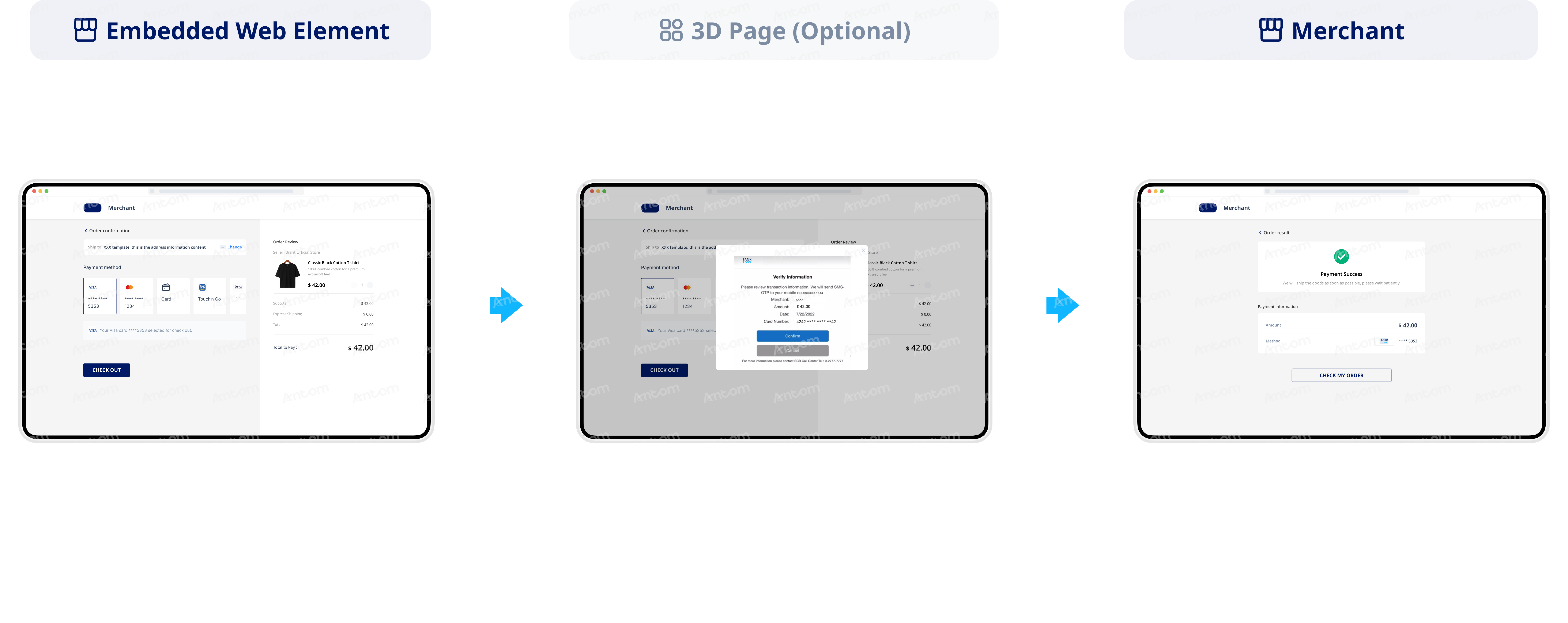
How to enable
You can use the following steps to complete tokenized payments:
- To display the save-a-card button, specify the value of the availablePaymentMethod.paymentMethodMetaData.tokenizeMode parameter as ASKFORCONSENTthrough the createPaymentSession (One-time Payments) API. The save-a-card button can be displayed in the card payment option on the Payment Element. This allows buyers to choose whether to store their card information. The following code shows an example of a request:
{
...
  "availablePaymentMethod": {
      "paymentMethodMetaData": {
          "tokenizeMode": "ASKFORCONSENT"
      }
  }
}- To store the card after the first payment, when the buyer stores their card information and the payment is successful, Antom will send you an asynchronous notification via the notifyPayment API. In this notification, paymentResultInfo contains the card token (cardToken) and the masked card number (cardNo). Make sure to associate the card information with the buyer’s information, and store the corresponding card details and cardToken securely on your server to process subsequent payments. The following is a sample code of an asynchronous notification:
{
  "actualPaymentAmount": {
      "currency": "HKD",
      "value": "10"
  },
  "notifyType": "PAYMENT_RESULT",
  "paymentAmount": {
      "currency": "HKD",
      "value": "10"
  },
  "paymentCreateTime": "2025-03-01T02:58:03-08:00",
  "paymentId": "2025**********01",
  "paymentMethodType": "CARD",
  "paymentRequestId": "PAYMENT_********TO",
  "paymentResultInfo": {
      "avsResultRaw": "I",
      "cardBrand": "VISA",
      "cardCategory": "CONSUMER",
      "cardNo": "************0197",
      "cardToken": "AL*****************PQ==",
      "cvvResultRaw": "",
      "funding": "CREDIT",
      "issuingCountry": "HK",
      "networkTransactionId": "58**********81",
      "paymentMethodRegion": "GLOBAL",
      "threeDSResult": {
          "cavv": "AJ*******************AA=",
          "eci": "05",
          "threeDSVersion": "2.2.0"
      }
  },
  "paymentTime": "2025-03-01T02:58:19-08:00",
  "result": {
      "resultCode": "SUCCESS",
      "resultMessage": "success.",
      "resultStatus": "S"
  }
}
- To use the card token in subsequent payments, if you use the Payment Element to render the payment method list, you need to pass in the cardToken information so that the Payment Element can display the stored card. Proceed as follows:
- In the createPaymentSession (One-time Payments) API, set the savedPaymentMethods.paymentMethodId parameter to the cardToken value obtained during the card‑binding stage.
- Set the availablePaymentMethod.paymentMethodMetaData.isCardOnFile parameter to trueto indicate when a stored card is used for subsequent payments. For more details, see Card‑on‑File (COF) transactions.
Note: For card token payments made with a stored card, avoid requiring buyers to re-enter the CVV code in order to improve payment convenience and transaction success rate.
The following sample code shows the createPaymentSession (One-time Payments) API initiates a request with the card token when the buyer uses a stored card to make payment.
{
...
  "availablePaymentMethod": {
      "paymentMethodMetaData": {
          "isCardOnFile": true
      }
  },
"savedPaymentMethods": [
      {
          "paymentMethodType": "CARD",
          "paymentMethodId": "AL****************=="
      }
  ]
...
}
User experience
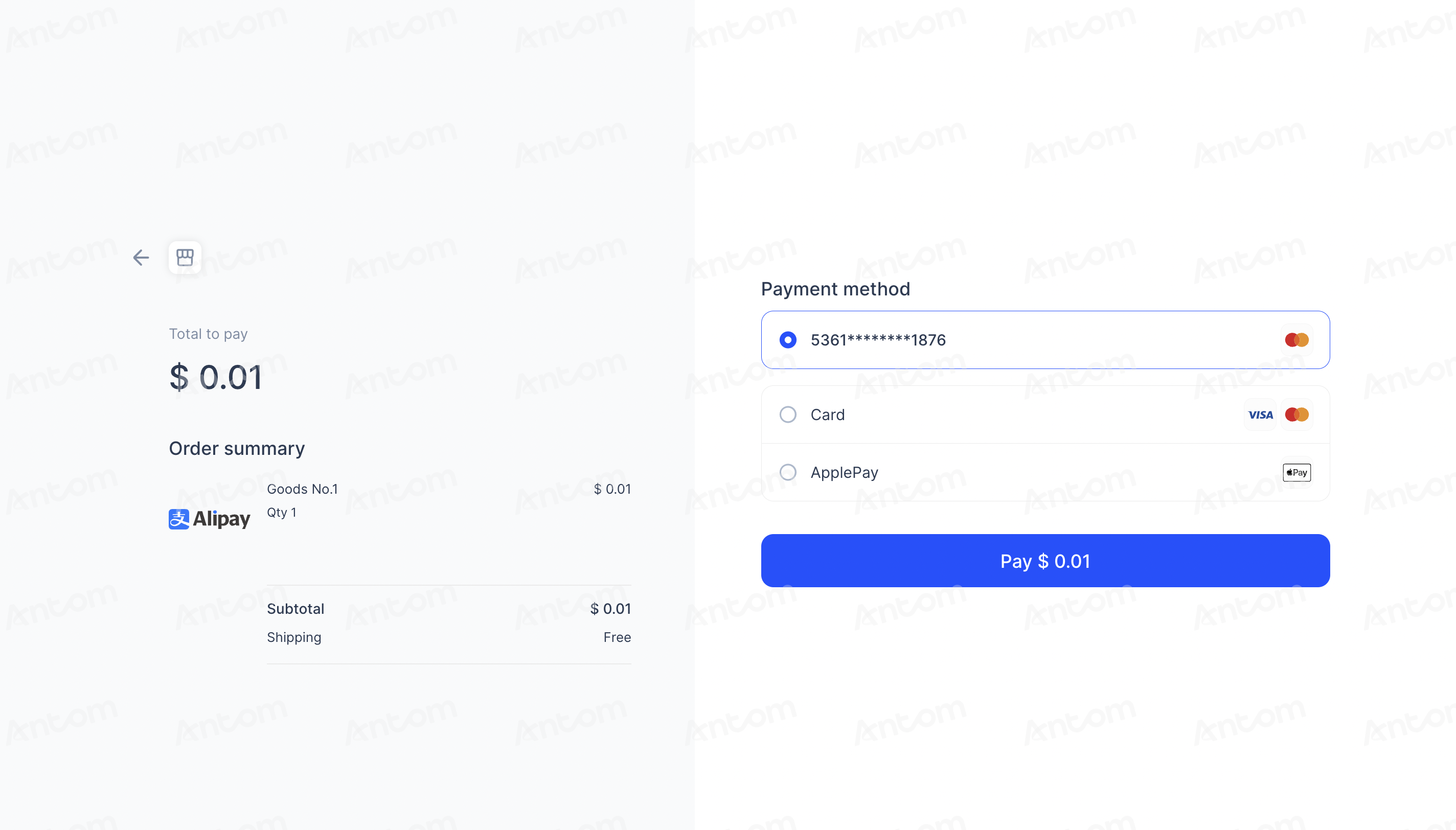
The following image shows the user experience of making a payment using a stored card using Antom Tokenization:
How to enable
You can use the following steps to complete tokenized payments:
- To display the save-a-card button, specify the value of the availablePaymentMethod.paymentMethodMetaData.tokenizeMode parameter as ASKFORCONSENTthrough the createPaymentSession (One-time Payments) API. The save-a-card button can be displayed in the card payment option on the Antom Checkout Page. This allows buyers to choose whether to store their card information. The following code shows an example of a request:
{
...
  "availablePaymentMethod": {
      "paymentMethodMetaData": {
          "tokenizeMode": "ASKFORCONSENT"
      }
  }
}- To store the card after the first payment, when the buyer stores their card information and the payment is successful, Antom will send you an asynchronous notification via the notifyPayment API. In this notification, paymentResultInfo contains the card token (cardToken) and the masked card number (cardNo). Make sure to associate the card information with the buyer’s information, and store the corresponding card details and cardToken securely on your server to process subsequent payments. The following is a sample code of an asynchronous notification:
{
  "actualPaymentAmount": {
      "currency": "HKD",
      "value": "10"
  },
  "notifyType": "PAYMENT_RESULT",
  "paymentAmount": {
      "currency": "HKD",
      "value": "10"
  },
  "paymentCreateTime": "2025-03-01T02:58:03-08:00",
  "paymentId": "2025**********01",
  "paymentMethodType": "CARD",
  "paymentRequestId": "PAYMENT_********TO",
  "paymentResultInfo": {
      "avsResultRaw": "I",
      "cardBrand": "VISA",
      "cardCategory": "CONSUMER",
      "cardNo": "************0197",
      "cardToken": "AL*****************PQ==",
      "cvvResultRaw": "",
      "funding": "CREDIT",
      "issuingCountry": "HK",
      "networkTransactionId": "58**********81",
      "paymentMethodRegion": "GLOBAL",
      "threeDSResult": {
          "cavv": "AJ*******************AA=",
          "eci": "05",
          "threeDSVersion": "2.2.0"
      }
  },
  "paymentTime": "2025-03-01T02:58:19-08:00",
  "result": {
      "resultCode": "SUCCESS",
      "resultMessage": "success.",
      "resultStatus": "S"
  }
}
- To use the card token in subsequent payments, follow the steps below:
- In the createPaymentSession (One-time Payments) API, set the savedPaymentMethods.paymentMethodId parameter to the cardToken value obtained during the card‑binding stage.
- Set the availablePaymentMethod.paymentMethodMetaData.isCardOnFile parameter to trueto indicate when a stored card is used for subsequent payments. For more details, see Card‑on‑File (COF) transactions.
Note: For card token payments made with a stored card, avoid requiring buyers to re-enter the CVV code in order to improve payment convenience and transaction success rate.
The following sample code shows the createPaymentSession (One-time Payments) API initiates a request with the card token when the buyer uses a stored card to make payment.
{
...
  "availablePaymentMethod": {
      "paymentMethodMetaData": {
          "isCardOnFile": true
      }
  },
"savedPaymentMethods": [
      {
          "paymentMethodType": "CARD",
          "paymentMethodId": "AL****************=="
      }
  ]
...
}
User experience
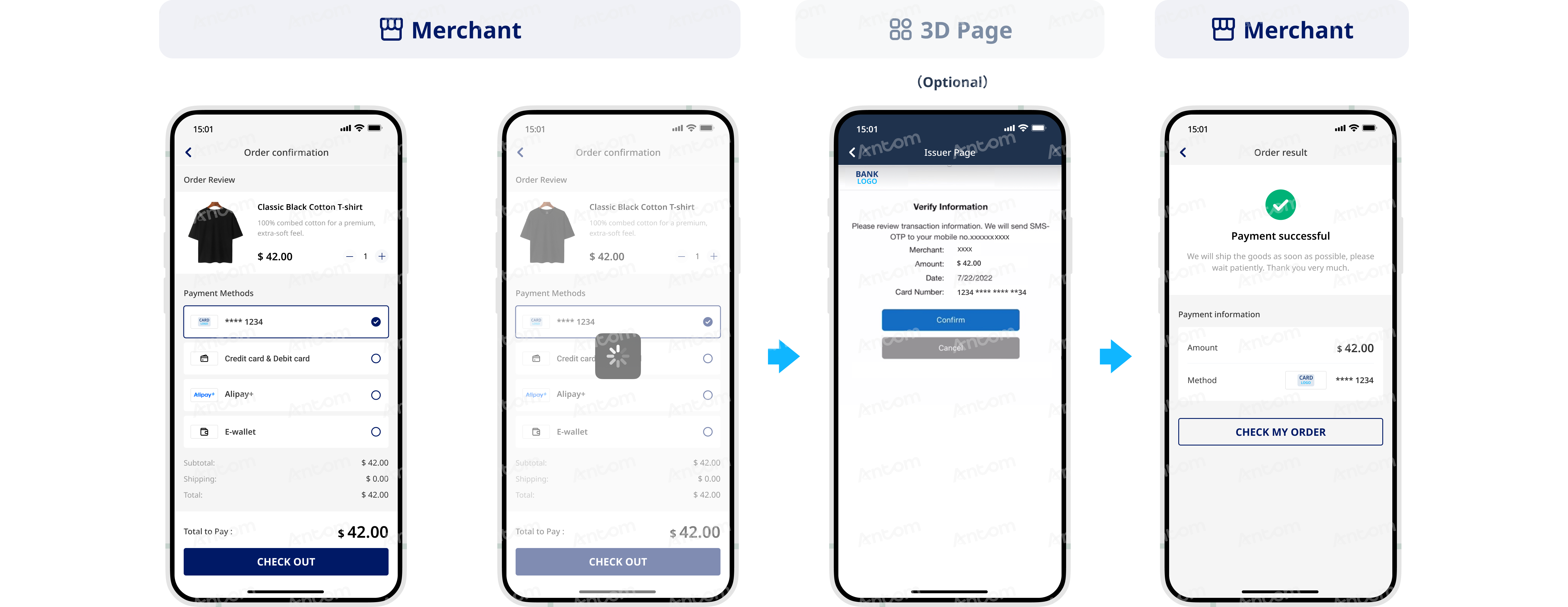
The following image shows the user experience of making a payment using a stored card using Antom Tokenization:
Card binding options
Antom currently offers the following card binding methods:
- Independent card binding: Independent of the payment process. Card information storage and binding must be completed separately, and subsequent payments are made using a cardToken.
- After-payment card binding: A card binding flag is set during the buyer’s payment process. After payment is completed, the card information is stored and the card is bound.
Independent card binding
Use the vaultPaymentMethod API to allow buyers to bind their bank cards at any stage of the payment process. For details, see Card binding.
After-payment card binding
If the buyer chooses to store their card information on the Antom page, you can pass the order information to Antom via the pay (One-time Payments) API and set the paymentMethod.paymentMethodMetaData.tokenizeMode parameter to
ASKFORCONSENT
. Antom will then generate the corresponding card token (cardToken) for that card information. After the payment authorization is successful, you can obtain the card token (cardToken) and masked card number (cardNo) either by receiving an asynchronous notification or by calling the inquiryPayment API.To process subsequent payments, you need to securely store the retrieved cardToken and masked card number (cardNo), and associate them with the buyer’s information. Proceed as follows:
- Specify the value of the paymentMethod.paymentMethodMetaData.tokenizeMode parameter as ASKFORCONSENTthrough the pay (One-time Payments) API to display the save-a-card button on the intermediate page. This allows buyers to choose whether to store their card information. The following code shows an example of a request:
{

  "paymentMethod":
  {
      "paymentMethodMetaData":
      {
          "tokenizeMode": "ASKFORCONSENT"
      },
      "paymentMethodType": "CARD"
  },
  ...
}- If the buyer stores their card information and the payment is successful, Antom will send you an asynchronous notification via the notifyPayment API. In this notification, paymentResultInfo contains the card token (cardToken) and the masked card number (cardNo). Make sure to associate the card information with the buyer’s information, and store the corresponding card details and cardToken securely on your server to process subsequent payments. The following is a sample code of an asynchronous notification:
{
  "actualPaymentAmount": {
      "currency": "HKD",
      "value": "10"
  },
  "notifyType": "PAYMENT_RESULT",
  "paymentAmount": {
      "currency": "HKD",
      "value": "10"
  },
  "paymentCreateTime": "2025-03-01T02:58:03-08:00",
  "paymentId": "2025**********01",
  "paymentMethodType": "CARD",
  "paymentRequestId": "PAYMENT_********TO",
  "paymentResultInfo": {
      "avsResultRaw": "I",
      "cardBrand": "VISA",
      "cardCategory": "CONSUMER",
      "cardNo": "************0197",
      "cardToken": "AL*****************PQ==",
      "cvvResultRaw": "",
      "funding": "CREDIT",
      "issuingCountry": "HK",
      "networkTransactionId": "58**********81",
      "paymentMethodRegion": "GLOBAL",
      "threeDSResult": {
          "cavv": "AJ*******************AA=",
          "eci": "05",
          "threeDSVersion": "2.2.0"
      }
  },
  "paymentTime": "2025-03-01T02:58:19-08:00",
  "result": {
      "resultCode": "SUCCESS",
      "resultMessage": "success.",
      "resultStatus": "S"
  }
}
Payment flow after card binding
Subsequent payments are initiated using the card token (cardToken). Proceed as follows:
- Display the masked card information to the buyer on the order page.
- After the buyer submits the payment, call the pay (One-time Payments) API and complete the following steps:
- Set the paymentMethod.paymentMethodId parameter to the cardToken value obtained during the card‑binding stage.
- Set the paymentMethod.paymentMethodMetaData.isCardOnFile parameter to trueto indicate when a stored card is used for subsequent payments. For more details, see Card‑on‑File (COF) transactions.
Note: For card token payments made with a stored card, avoid requiring buyers to re-enter the CVV code in order to improve payment convenience and transaction success rate.
The following shows the sample code of a request:
"paymentMethod":
  {
      "paymentMethodMetaData":
      {
          "isCardOnFile": true
      },
      "paymentMethodType": "CARD",
      "paymentMethodId": "AL****************=="
  }
User experience
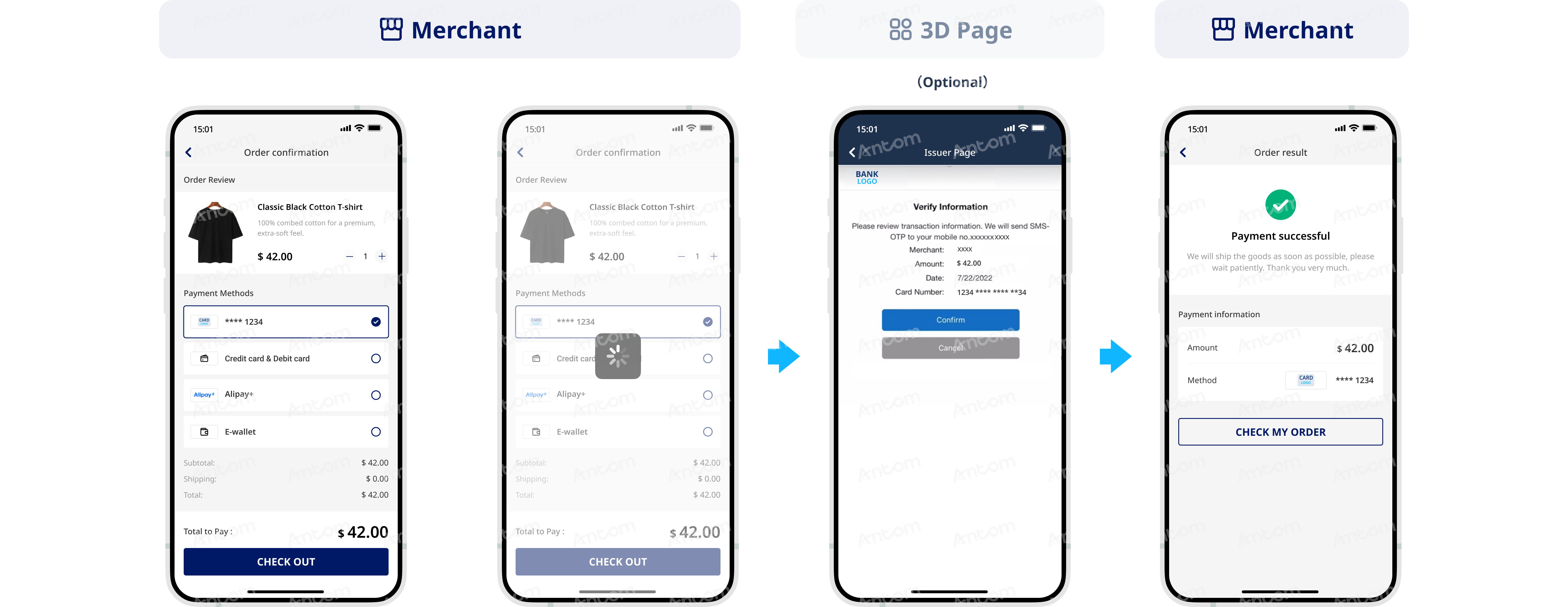
The following image shows the user experience of making a payment using a stored card using Antom Tokenization:
Card binding options
Antom currently offers the following card binding methods:
- Independent card binding: Independent of the payment process. Card information storage and binding must be completed separately, and subsequent payments are made using a cardToken.
- After-payment card binding: A card binding flag is set during the buyer’s payment process. After payment is completed, the card information is stored and the card is bound.
Independent card binding
Use the vaultPaymentMethod API to allow buyers to bind their bank cards at any stage of the payment process. For details, see Card binding.
After-payment card binding
If the buyer chooses to store their card information on the Antom page, you can pass the order information to Antom via the pay (One-time Payments) API and set the paymentMethod.paymentMethodMetaData.tokenizeMode parameter to
ENABLED
. Antom will then generate the corresponding card token (cardToken) for that card information. After the payment authorization is successful, you can obtain the card token (cardToken) and masked card number (cardNo) either by receiving an asynchronous notification or by calling the inquiryPayment API.To process subsequent payments, you need to securely store the retrieved cardToken and masked card number (cardNo), and associate them with the buyer’s information. Proceed as follows:
- Specify the value of the paymentMethod.paymentMethodMetaData.tokenizeMode parameter as ENABLEDthrough the pay (One-time Payments) API. The following code shows an example of a request:
{

"paymentMethod":
{
  "paymentMethodMetaData":
  {
    "cvv": "682",
    "cardholderName":
    {
      "firstName": "Tom",
      "lastName": "Jerry"
    },
    "expiryMonth": "11",
    "expiryYear": "28",
    "cardNo": "411227******9954",
    "tokenizeMode": "ENABLED"
  },
  "paymentMethodType": "CARD"
},
...
}- If the buyer stores their card information and the payment is successful, Antom will send you an asynchronous notification via the notifyPayment API. In this notification, paymentResultInfo contains the card token (cardToken) and the masked card number (cardNo). Make sure to associate the card information with the buyer’s information, and store the corresponding card details and cardToken securely on your server to process subsequent payments. The following is a sample code of an asynchronous notification:
{
  "actualPaymentAmount": {
      "currency": "HKD",
      "value": "10"
  },
  "notifyType": "PAYMENT_RESULT",
  "paymentAmount": {
      "currency": "HKD",
      "value": "10"
  },
  "paymentCreateTime": "2025-03-01T02:58:03-08:00",
  "paymentId": "2025**********01",
  "paymentMethodType": "CARD",
  "paymentRequestId": "PAYMENT_********TO",
  "paymentResultInfo": {
      "avsResultRaw": "I",
      "cardBrand": "VISA",
      "cardCategory": "CONSUMER",
      "cardNo": "************0197",
      "cardToken": "AL*****************PQ==",
      "cvvResultRaw": "",
      "funding": "CREDIT",
      "issuingCountry": "HK",
      "networkTransactionId": "58**********81",
      "paymentMethodRegion": "GLOBAL",
      "threeDSResult": {
          "cavv": "AJ*******************AA=",
          "eci": "05",
          "threeDSVersion": "2.2.0"
      }
  },
  "paymentTime": "2025-03-01T02:58:19-08:00",
  "result": {
      "resultCode": "SUCCESS",
      "resultMessage": "success.",
      "resultStatus": "S"
  }
}
Payment flow after card binding
Subsequent payments are initiated using the card token (cardToken). Proceed as follows:
- Display the masked card information to the buyer on the order page.
- After the buyer submits the payment, call the pay (One-time Payments) API and complete the following steps:
- Set the paymentMethod.paymentMethodId parameter to the cardToken value obtained during the card‑binding stage.
- Set the paymentMethod.paymentMethodMetaData.isCardOnFile parameter to trueto indicate when a stored card is used for subsequent payments. For more details, see Card‑on‑File (COF) transactions.
Note: For card token payments made with a stored card, avoid requiring buyers to re-enter the CVV code in order to improve payment convenience and transaction success rate.
The following shows the sample code of a request:
"paymentMethod":
  {
      "paymentMethodMetaData":
      {
          "isCardOnFile": true
      },
      "paymentMethodType": "CARD",
      "paymentMethodId": "ALIPAYgzViZySEK**********5dAgkzs********xI0ssHmyU3VyWCloE4MwfmN48sP1+rSPQ=="
  }
With SDK integration, the SDK provides a payment information collection page. After entering their card details, the buyer can choose to save the information to avoid re‑entering it for subsequent payments. When buyers save their card information, Antom will store the information and generates a corresponding card token (cardToken). After the payment authorization is successful, you can obtain the card token (cardToken) and masked card number (cardNo) either by receiving an asynchronous notification or by calling the inquiryPayment API.
When the buyer makes a subsequent payment using a stored card, you need to set the paymentMethod.paymentMethodId parameter to the cardToken value when calling the createPaymentSession (One-time Payments) API.
The following sample code shows how your server calls the createPaymentSession (One-time Payments) API when the buyer makes a subsequent payment using a stored card:
{
"productCode": "CASHIER_PAYMENT",
"paymentRequestId": "55bf********74eb",
"order": {
  "referenceOrderId": "926e************e18c",
  "orderDescription": "xxxxx",
  "orderAmount": {
    "currency": "BRL",
    "value": "100"
  },
  "buyer": {
    "referenceBuyerId": "ye******da",
    "buyerPhoneNo": "134******71"
  }
},
"paymentAmount": {
  "currency": "BRL",
  "value": "100"
},
"paymentMethod": {
  "paymentMethodType": "CARD",
  "paymentMethodId": "alipayCardToken"
},
"paymentRedirectUrl": "https://www.yourMerchantWeb.com",
"paymentNotifyUrl": "https://www.yourNotifyUrl",
"paymentFactor": {
  "isAuthorization": true
},
"settlementStrategy": {
  "settlementCurrency": "EUR"
}
}