Antom 3DS-Retry intelligently and automatically handles transactions that are soft-declined due to reasons such as incomplete 3DS authentication. Through built-in strategies, it automatically re-initiates 3DS authentication for eligible transactions at the appropriate time, effectively recovering payment opportunities and improving overall conversion rates. Whether you initially enabled 3DS authentication or not, this feature can restore transactions requiring authentication, reducing the risk of declines caused by missing authentication.
To enable Antom 3DS-Retry, simply set the enableAuthenticationUpgrade parameter to true
when initiating a transaction. If this feature is not enabled, card schemes may decline transactions as high-risk when 3DS authentication is mandatory but not performed. Once enabled, Antom will automatically attempt to recover such transactions without requiring additional action from you. Note: Only cards supporting 3D Secure 2 can enable Antom 3DS-Retry. Antom's 3DS and 3DS-Retry feature collectively determine whether a transaction ultimately undergoes 3DS authentication. The table below illustrates the impact of these settings on transactions: The figure below illustrates the payment flow with Antom 3DS-Retry enabled:
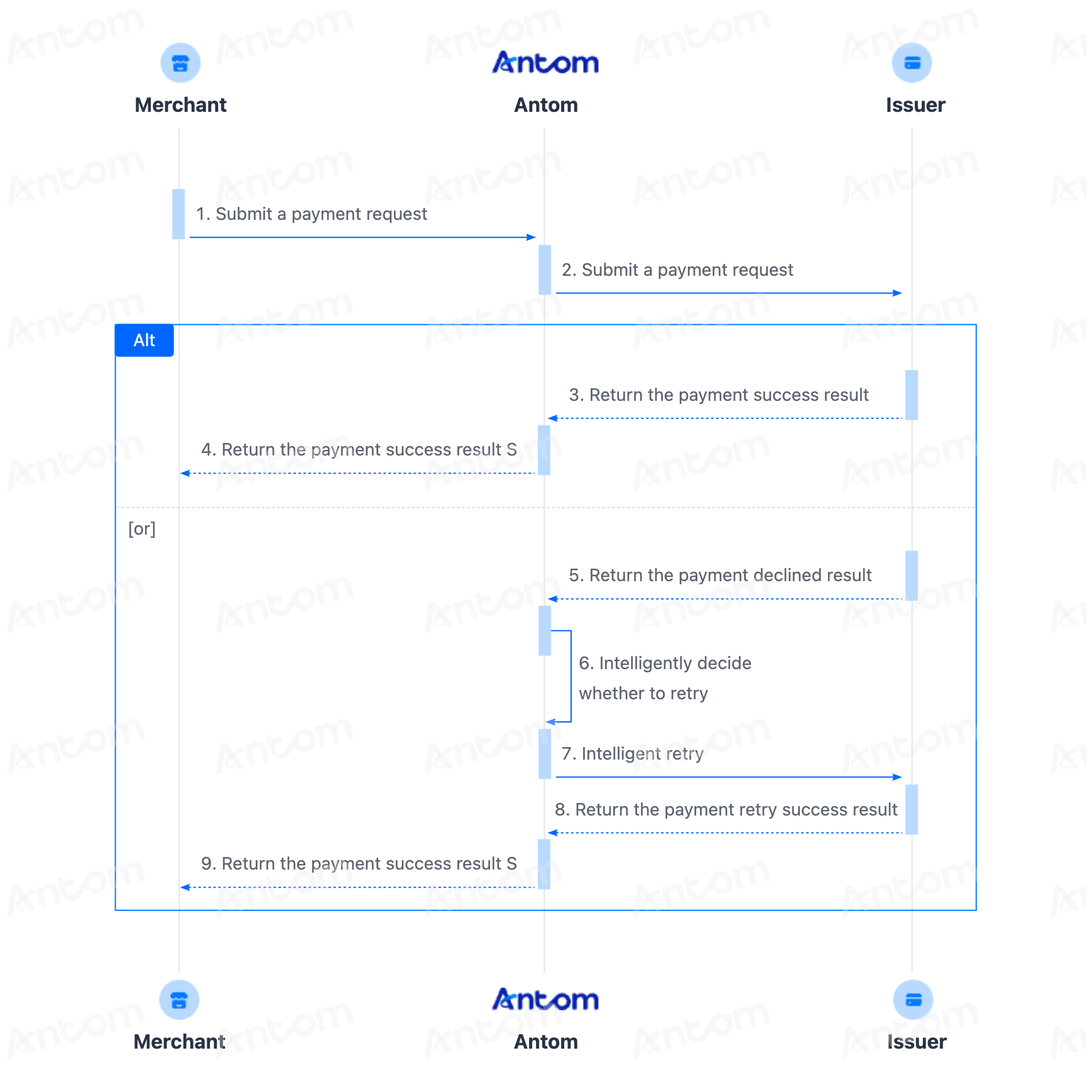
- The merchant submits a payment request.
- If the payment is soft-declined due to reasons such as incomplete 3DS authentication, Antom 3DS-Retry will intelligently decide and retry the payment.
- If Antom's automatic retry is successful, a successful payment result will be returned to you.
When calling the createPaymentSession (One-time Payments) API, set the availablePaymentMethod.paymentMethodMetaData.enableAuthenticationUpgrade parameter to true
or leave it as the default value to enable Antom 3DS-Retry. {
...
"availablePaymentMethod": {
"paymentMethodMetaData": {
"enableAuthenticationUpgrade": true
}
},
...
}
When calling the createPaymentSession (One-time Payments) API, set the availablePaymentMethod.paymentMethodMetaData.enableAuthenticationUpgrade parameter to true
or leave it as the default value to enable Antom 3DS-Retry. {
...
"availablePaymentMethod": {
"paymentMethodMetaData": {
"enableAuthenticationUpgrade": true
}
},
...
}
When calling the pay (One-time Payments) API, set the paymentMethod.paymentMethodMetaData.enableAuthenticationUpgrade parameter to true
or leave it as the default value to enable Antom 3DS-Retry. {
...
"paymentMethod": {
"paymentMethodMetaData": {
"enableAuthenticationUpgrade": true
}
},
...
}
Note: After enabling Antom 3DS-Retry, if you set the is3DSAuthentication parameter to false
or leave it as the default value (specify the transaction as a non-3DS transaction), in the stored card payment scenario, the pay (One-time Payments) API will return a normalUrl corresponding to the card information collection page. Under this configuration, even if the transaction is specified as non-3DS, if the issuer declines the payment after the buyer submits it, the buyer may still be redirected to a 3DS URL for verification instead of directly receiving the final transaction result (success or failure). If you need to disable Antom 3DS-Retry in this scenario, set paymentMethod.paymentMethodMetaData.enableAuthenticationUpgrade to false
. The example code is as follows: {
...
"paymentMethod": {
"paymentMethodMetaData": {
"is3DSAuthentication": false,
"enableAuthenticationUpgrade": false
}
},
...
}
When calling the pay (One-time Payments) API, set the paymentMethod.paymentMethodMetaData.enableAuthenticationUpgrade parameter to true
or leave it as the default value to enable Antom 3DS-Retry. {
...
"paymentMethod": {
"paymentMethodMetaData": {
"cvv": "111",
"expiryMonth": "12",
"expiryYear": "29",
"cardNo": "49************75",
"enableAuthenticationUpgrade": true
}
},
...
}
Note: After enabling Antom 3DS-Retry, if you set the is3DSAuthentication parameter to false
or leave it as the default value (specify the transaction as a non-3DS transaction), the pay (One-time Payments) API may return a normalUrl requiring the buyer to redirect to a 3DS URL for verification, instead of directly returning the final transaction result (success or failure). If you need to disable Antom 3DS-Retry in this scenario, set paymentMethod.paymentMethodMetaData.enableAuthenticationUpgrade to false
. The example code is as follows: {
...
"paymentMethod": {
"paymentMethodMetaData": {
"is3DSAuthentication": false,
"enableAuthenticationUpgrade": false
}
},
...
}