
Store a card (Direct API)
This guide instructs you on how to integrate independent card binding through server-to-server mode, allowing buyers to bind their bank cards at any stage of the payment process. In this solution, you can collect the buyer's plain card information and submit the information to Antom for storage. Once the binding is successful, Antom will return the corresponding card token (cardToken). In subsequent transactions, you can directly use the cardToken parameter to initiate payments without collecting the buyer's card information again. For token (cardToken) payments, please refer to Card-on-File (COF) transactions.
Server-to-server integration mode requires that you are PCI qualified. Please provide the relevant materials based on your business needs to complete the verification:
- If your annual card transaction volume is expected to exceed 6 million, complete and submit the PCI Attestation of Compliance (AoC) file for verification.
- If your annual card transaction volume is expected to be below 6 million, complete and submit the PCI DSS Self-Assessment Questionnaires (SAQs) file for verification.
For more information about PCI DSS compliance requirements, see PCI DSS standard.
User experience
The following images show the user experience during the card binding process and the subsequent payments after successful binding.
Binding process
The following diagram illustrates the card binding process across different platforms.
Web


Subsequent payments
The following diagram illustrates the user experience of subsequent payments on different platforms after successful card binding.
Web


Binding flow
The following steps describe the card binding process in a server-to-server integration mode:
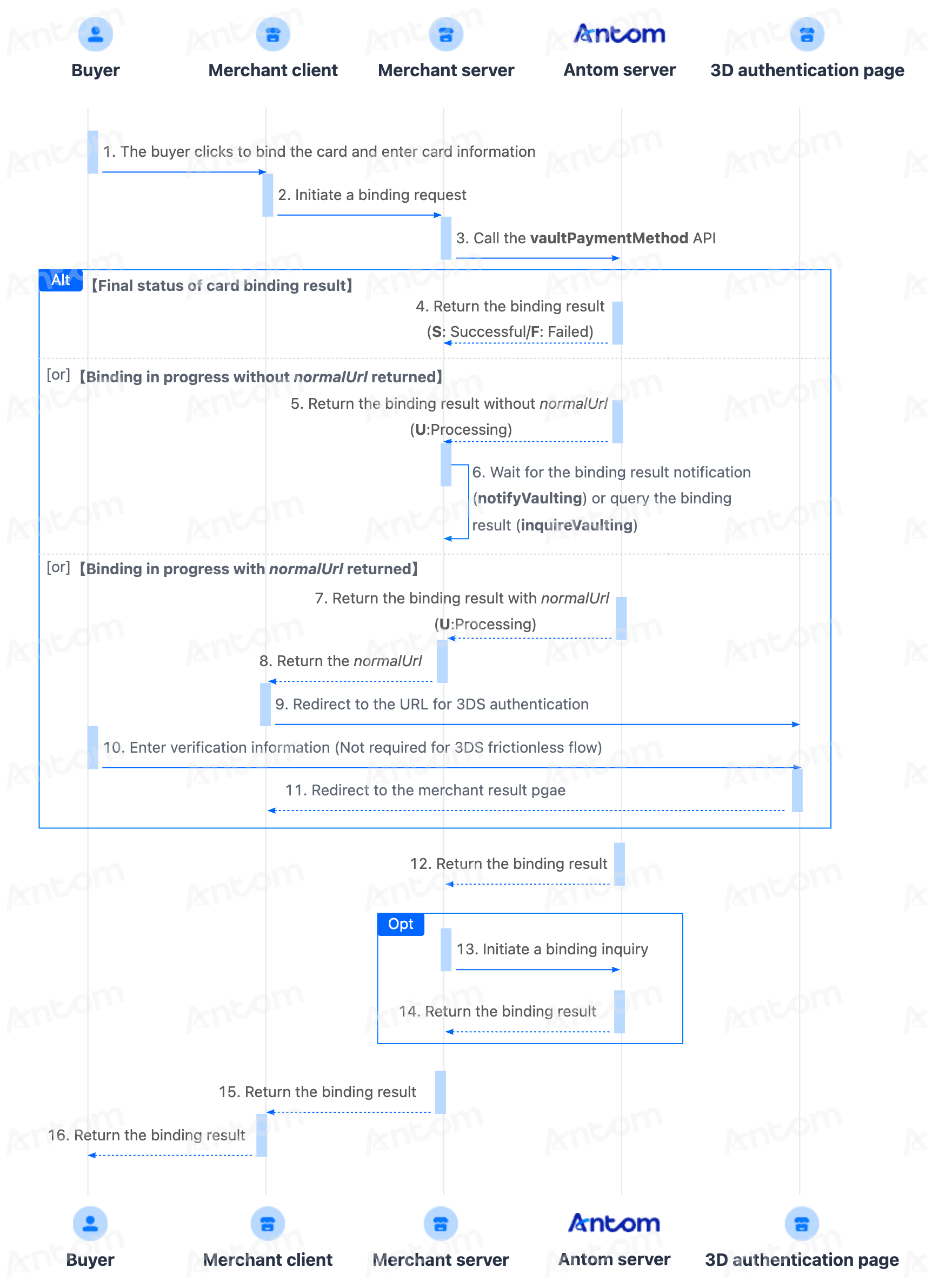
- The buyer clicks to bind a card.
- Call the vaultPaymentMethod API and initiate a card binding request.
After the buyer clicks the card binding button, your server calls the Antom server's vaultPaymentMethod API to initiate the card binding request. - The buyer completes card binding.
The buyer completes card binding on the merchant page. - (Optional) The buyer completes 3D authentication.
If 3D authentication is specified, Antom returns a 3D URL to the client. You need to redirect the buyer to the 3D authentication page (normalUrl), and guide them to complete the 3D authentication. - Obtain the card binding result.
You can obtain the card vaulting result through either of the following two methods:
- Asynchronous notification: Antom will send you the card binding result notifications via the notifyVaulting API.
- Synchronous inquiry: Call the inquireVaulting API to check the binding status.
Note: On the card binding management page, you must present the masked card number of the buyer’s stored card. For subsequent payments, it is recommended to pass in cardToken obtained from the initial binding through the notifyVaulting or inquireVaulting API, or you can use the stored plain card number.
Integration preparations
Before you start integrating, read the Integration Guide and API Overview documents to understand the integration steps of the server-side API and the precautions for calling the API. Furthermore, ensure that the following prerequisites are met:
- Obtain a client ID
- Complete the key configuration
- Complete the configuration of paymentNotifyUrl to receive the asynchronous notification
- Integrate the server-side SDK package, install the server-side library, and initialize a request instance. For more details, refer to Server-side SDKs.
Integration steps
Most bank card payments follow the general payment flow and integration process provided by Antom. Follow the steps below to begin your integration:
- Initiate a card vaulting request
- (Optional) Redirect to 3D authentication page (normalUrl)
- Obtain the vaulting result
Step 1: Initiate a card binding request
Call the vaultPaymentMethod API and pass the following key parameters to initiate a card binding request:
Parameter name | Required | Description |
paymentMethodDetail.card | Yes | Pass in the card information that needs to be bound. |
vaultingRequestId | Yes | The unique ID generated by the merchant. Every time you initiate card binding, you must have a new ID. |
paymentMethodDetail.paymentMethodType | Yes | The field is fixed to |
paymentMethodDetail.card.is3DSAuthentication | No | Specify whether 3D authentication is required for this card binding request. Set the value to
|
redirectUrl | Yes | The merchant side binds the results page, which needs to be displayed based on the server side results. |
vaultingNotificationUrl | Yes | The card binding result notification address. |
env | Yes | The environment in which the buyer initiates a card binding request. |
For more information about complete parameters, refer to the vaultPaymentMethod API.
You need to call the vaultPaymentMethod API to initiate the card binding request.The following sample code shows how to call the vaultPaymentMethod API:
public static void  vaultPaymentMethod(){
    AlipayVaultingPaymentMethodRequest alipayVaultingPaymentMethodRequest = new AlipayVaultingPaymentMethodRequest();

    // set card info
    CardPaymentMethodDetail cardPaymentMethodDetail = CardPaymentMethodDetail.builder().cardNo("4054695723100768").expiryMonth("01").expiryYear("2030").build();
    PaymentMethodDetail paymentMethodDetail = PaymentMethodDetail.builder().paymentMethodType("CARD").card(cardPaymentMethodDetail).build();
    alipayVaultingPaymentMethodRequest.setPaymentMethodDetail(paymentMethodDetail);

    // set env
    Env env = Env.builder().terminalType(TerminalType.WEB).build();
    alipayVaultingPaymentMethodRequest.setEnv(env);

    // replace with your vaultingRequestId
    String vaultingRequestId = UUID.randomUUID().toString();
    alipayVaultingPaymentMethodRequest.setVaultingRequestId(vaultingRequestId);

    // replace with your notificationUrl
    alipayVaultingPaymentMethodRequest.setVaultingNotificationUrl("https://www.yourNotifyUrl.com");

    // replace with your redirectUrl
    alipayVaultingPaymentMethodRequest.setRedirectUrl("https://www.yourMerchantWeb.com");

    // do vaulting
    AlipayVaultingPaymentMethodResponse alipayVaultingPaymentMethodResponse;

    try{
        alipayVaultingPaymentMethodResponse = CLIENT.execute(alipayVaultingPaymentMethodRequest);
    }catch (AlipayApiException e){
        String errorMsg = e.getMessage();
    }
}
The following sample codes show the examples of initiating a card binding request message, and you can also specify whether 3D authentication is required:
Non-3D authentication
{
  "vaultingRequestId": "VAULT_20250508183612361_AUTO",
  "vaultingNotificationUrl": "https://kademo.intlalipay.cn/payments/notifySuccess",
  "redirectUrl": "https://kademo.intlalipay.cn/melitigo/Test_114.html",
  "paymentMethodDetail": {
    "paymentMethodType": "CARD",
    "card": {
      "cvv": "**5",
      "cardholderName": {
        "firstName": "liang",
        "lastName": "x*****n"
      },
      "expiryMonth": "**",
      "expiryYear": "**",
      "payerEmail": "2421********com",
      "cardNo": "537********1310"
    }
  },
  "env": {
    "terminalType": "APP",
    "osType":"IOS",
    "clientIp":"12.99.168.1"
  }
}The following codes show samples of the response:
The binding is successful
{
  "paymentMethodDetail": {
    "card": {
      "brand": "MASTERCARD",
      "cardToken": "ALIPAYEfG2DFbGx2Eh****************************XA7nyWCloE4MwfmN48sP1+rSPQ==",
      "maskedCardNo": "************1310"
    },
    "paymentMethodType": "CARD"
  },
  "vaultingRequestId": "VAULT_20250508183612361_AUTO",
  "result": {
    "resultCode": "SUCCESS",
    "resultMessage": "success.",
    "resultStatus": "S"
  }
}
The table below shows the possible values of result.resultStatus in the response. Please handle the result according to the guidance provided:
result.resultStatus | Message | Further action |
| Indicates that the card binding is successful. | It is recommended to store the following parameters for subsequent payments:
|
| Indicates that the card binding failed. | Check and verify whether the required request fields (including the header fields and body fields) of the current API are correctly passed and valid. |
| Indicates that the card binding is being processed. | Perform operations based on whether the value of result.resultCode is
|
Note: If no response is received, it may indicate a network timeout. Please use the same vaultingRequestId to call the API again.
(Optional) Step 2: Redirect to 3D authentication page (normalUrl)
After the merchant server obtains normalUrl from Antom and passes it to the frontend, it will redirect from the merchant frontend to the 3D authentication page. After card binding is completed, the system will redirect back to the redirectUrl you provided in the binding request. You need to display the binding result based on the response returned by Antom.
Web
After obtaining the normalUrl, you need to redirect the page to the 3D authentication page in a browser or open it in a new tab.
if (serverResponse.normalUrl != null) {
  window.open(serverResponse.normalUrl, '_blank');
}Common question
Q: Is 3D Secure supported?
A: Yes. For details, refer to 3D Secure 2.
Step 3: Obtain the card binding result
You can obtain the card binding result through either of the following two methods:
- Receive asynchronous notifications: Antom will send you the card binding result notifications via the notifyVaulting API.
- Inquire about the binding result: Call the inquireVaulting API to check the binding status.
Asynchronous notification
Asynchronous notification
1. Configure the webhook URL to receive asynchronous notifications
If each of your binding operations has a unique notification URL, it is recommended to set the webhook URL in each request. You can pass the asynchronous notification receiving URL for the specific order through vaultingNotificationUrl in the vaultPaymentMethod API.
The following code shows a sample of the asynchronous notification request:
{
    "paymentMethodDetail": {
        "card": {
            "brand": "MASTERCARD",
            "cardToken": "ALIPAY34RlcCU3ZtZ***********************sVYl8x244tyWCloE4MwfmN48sP1+rSPQ==",
            "maskedCardNo": "************1310",
            "networkTransactionId": "112000********575887"
        },
        "paymentMethodType": "CARD"
    },
    "vaultingRequestId": "VAULT_20250*****3348834_AUTO",
    "result": {
        "resultCode": "SUCCESS",
        "resultMessage": "success.",
        "resultStatus": "S"
    }
}
The following table shows the possible values of result.resultStatus in the notification request of authorization result. Please handle the result according to the guidance provided:
result.resultStatus | Message | Further actions |
| Indicates that the card vaulting is successful. | It is recommended to store the following parameters for subsequent payments:
|
| Indicates that the card vaulting failed. | Please check result.resultCode to identify the specific failure reason. |
2. Verify the asynchronous notification
When you receive an asynchronous notification from Antom, you are required to return the response in the Sample code format, but you do not need to countersign the response.
You need to verify the signature of the authorization payment notification sent by Antom:
import javax.servlet.http.HttpServletRequest;

import org.springframework.http.ResponseEntity;
import org.springframework.web.bind.annotation.PostMapping;
import org.springframework.web.bind.annotation.RequestBody;
import org.springframework.web.bind.annotation.RestController;

import com.alipay.global.api.model.Result;
import com.alipay.global.api.model.ResultStatusType;
import com.alipay.global.api.response.AlipayResponse;
import com.alipay.global.api.tools.WebhookTool;

@RestController
public class PaymentNotifyHandleBySDK {

    /**
     * alipay public key, used to verify signature
     */
    private static final String SERVER_PUBLIC_KEY = "";

    /**
     * payment result notify processor
     * using <a href="https://spring.io">Spring Framework</a>
     *
     * @param request    HttpServletRequest
     * @param notifyBody notify body
     * @return
     */
    @PostMapping("/payNotify")
    public Object payNotifyHandler(HttpServletRequest request, @RequestBody String notifyBody) {

        // retrieve the required parameters from http request.
        String requestUri = request.getRequestURI();
        String requestMethod = request.getMethod();

        // retrieve the required parameters from request header.
        String requestTime = request.getHeader("request-time");
        String clientId = request.getHeader("client-id");
        String signature = request.getHeader("signature");

        Result result;
        AlipayResponse response = new AlipayResponse();

        try {
            // verify the signature of notification
            boolean verifyResult = WebhookTool.checkSignature(requestUri, requestMethod, clientId, requestTime, signature, notifyBody, SERVER_PUBLIC_KEY);
            if (!verifyResult) {
                throw new RuntimeException("Invalid notify signature");
            }

            // deserialize the notification body

            // update the order status with notify result

            // respond the server that the notification is received
            result = new Result("SUCCESS", "success", ResultStatusType.S);

        } catch (Exception e) {
            String errorMsg = e.getMessage();
            // handle error condition
            result = new Result("ERROR", errorMsg, ResultStatusType.F);
        }
        response.setResult(result);
        return ResponseEntity.ok().body(response);
    }

}
Whether the vaulting is successful or not, each notification request must be responded to in the format specified below. Otherwise, Antom will resend the asynchronous notification.
{
    "result": {
        "resultCode": "SUCCESS",
        "resultStatus": "S",
        "resultMessage": "success"
    }
}Common questions
Q: Will an asynchronous notification be sent immediately after a successful card binding?
A: The asynchronous notification for the card binding result is sent within seconds, typically 3 to 5 seconds after the card binding succeeds.
Q: Will an asynchronous notification be sent if the card binding fails?
A: Yes, it will be sent.
Q: Will the asynchronous notification be re-sent?
A: Yes, the asynchronous notification will be re-sent automatically within 24 hours for the following cases:
The notification can be resent up to 8 times or until a correct response is received to terminate delivery. The sending intervals are as follows: 0 minutes, 2 minutes, 10 minutes, 10 minutes, 1 hour, 2 hours, 6 hours, and 15 hours.
- If you didn't receive the asynchronous notification due to network reasons.
- If you receive an asynchronous notification from Antom, but you did not respond to the notification in the Sample code format.
Q: Do I need to verify the signature upon receiving a binding result notification?
A: Yes. Signature verification is necessary to ensure that the request was sent to you by Antom. When performing verification, the assembled message must strictly adhere to the following format:
<http-method> <http-uri> <client-id>.<request-time>.<request-body>. For the<request-body>part, you must use its original, unprocessed string value.
Q: How long is the validity period of the returned cardToken?
A: The cardToken itself is permanently valid. If the card expires, it will become invalid at the same time. If the card expires, when you call the payment request again, Antom will return the
INVALID_EXPIRATION_DATEerror code. It is recommended that you guide the buyer to re-bind the updated card information.
Q: Do I have to use the cardToken returned by Antom for subsequent payments?
A: If you store the plaint card number yourself after completing card binding, you may use the plaint card number for subsequent payments. However, it is strongly recommended that you use Antom's cardToken to initiate subsequent transactions, as data shows that the success rate of subsequent Card-on-File (COF) transactions initiated using Antom's cardToken is significantly higher than using the method of storing card information by yourself.
Q: Do all 3DS transactions return a normalUrl that is used to redirect to the 3DS authentication page?
A: No. In certain scenarios, the issuer returns the 3DS frictionless result synchronously, and Antom will directly return the authorization result (resultStatus) and 3DS result (threeDSResult) in the vaultPaymentMethod API's synchronous response.