
Accept payments with seQura
seQura is one of Spain’s top Buy Now Pay Later providers, offering interest-free plans and longer-term financing tailored to local preferences. It focuses on e-commerce integration and risk-powered underwriting, trusted by Gen Z and Millennials. seQura is accepted by over 5,000 merchants across 15 verticals.
This topic introduces how to integrate seQura with your website or application. Whether buyers use mobile devices or desktop browsers, they can quickly access secure and efficient localized payment capabilities, significantly improving payment experience and success rate.
Payment flow
The payment flow of this payment method is composed of the following steps:
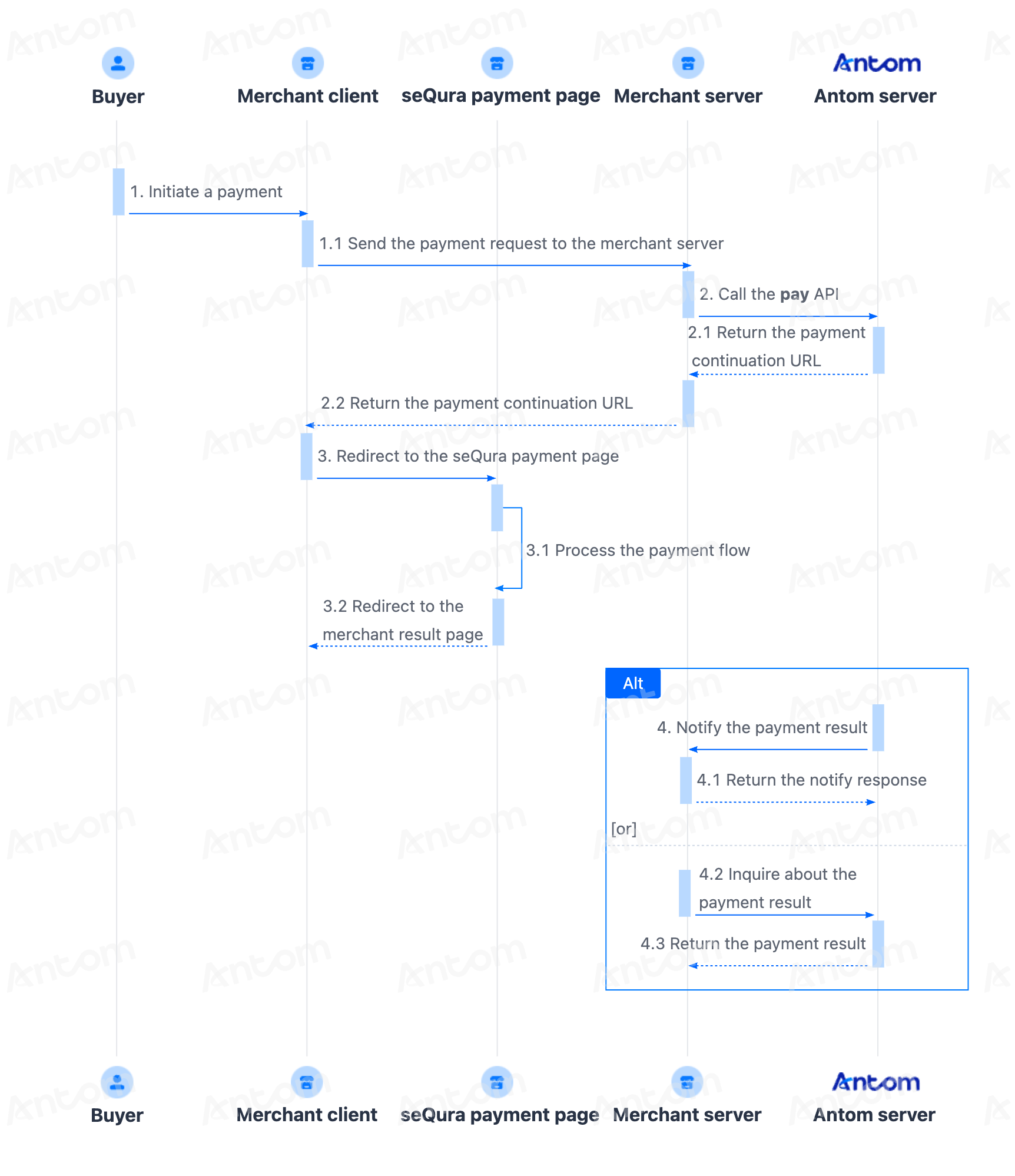
- The buyer enters the checkout page.
- Create a payment request.
After the buyer selects a payment method and submits the order, the merchant server calls the pay (One-time Payments) API to obtain the payment link to complete the payment. - Handle the payment continuation URL.
The merchant client redirects to the URL page returned by the payment request, or invokes the relevant application to complete the payment. - Get the payment result.
The merchant server receives the payment result notification returned by the Antom server, and processes the transaction according to the result. Obtain the payment result using one of the following two methods:
- Asynchronous notification: Specify the paymentNotifyUrl in the pay (One-time Payments) API to set the address for receiving asynchronous notifications. When the payment is successful or expires, Antom uses notifyPayment to send asynchronous notifications to you.
- Synchronous inquiry: Call the inquiryPayment API to check the payment status.
Integration preparations
Before you start integrating, read the Integration Guide and API Overview documents to understand the integration steps of the server-side API and the precautions for calling the API. Furthermore, ensure that the following prerequisites are met:
- Obtain a client ID
- Complete the key configuration
- Complete the configuration of paymentNotifyUrl to receive the asynchronous notification
- Integrate the server-side SDK package, install the server-side library, and initialize a request instance. For more details, refer to Server-side SDKs.
Integration Steps
Follow these steps to start the integration:
- Add seQura to the payment method list
- Create a payment order
- Get the payment continuation URL
- Receive the asynchronous notification
Step 1: Add seQura to the payment method list
Follow the steps detailed in Step 1: Add a list of payment methods to obtain and display seQura logo and name on the buyer's order page.
Step 2: Create a payment order
Call the pay (One-time Payments) API to create a payment request. The key parameters listed below are essential for initiating a payment request with seQura, tailored according to the merchant's business nature.
Notes:
- Your business nature is defined through order.goods.goodsCategory during the channel registration, and there are three types:
product,serviceor travel (lodgingandflight). For more information, contact Business Development (BD). - For merchants whose business nature involves flight or lodging, seQura has specific limitation regarding on products (such as hotel, flight, car). Failure to meet these requirements will result in payment failure.
- One-way travel: only allowed for departure and arrival destinations both in EEA (European Economic Area) region, with a minimum booking time of at least 14 days in advance.
- Round-way travel: allowed worldwide, with a minimum booking time of at least 14 days in advance.
Parameter name | Required | Description |
env.terminalType | Yes | Terminal type of which the merchant service applies to. Valid values are:
|
env.osType | No | Type of the operation system. Valid values are:
Note: Specify this parameter when terminalType is not |
productCode | Yes | Represents the payment product that is being used. For One-time Payments, the value is fixed as |
paymentRequestId | Yes | The unique ID assigned by a merchant to identify a payment request. |
settlementStrategy | Yes | The settlement strategy for the payment request. |
paymentAmount.currency | Yes | The payment amount that the merchant requests to receive in the order currency. |
paymentAmount.value | Yes | The payment amount that the merchant requests to receive. |
paymentExpiryTime | No | The payment expiration time is a specific time after which the payment will expire and the acquirer or merchant must terminate the order processing. |
paymentRedirectUrl | Yes | The merchant page URL that the user is redirected to after the payment is completed. |
paymentNotifyUrl | No | The URL that is used to receive the result notification. |
paymentMethod.paymentMethodType | Yes | The payment method type that is included in payment method options. In this integration scenario, the value of this parameter is |
paymentMethod.paymentMethodMetaData.channelOptionBill.channelPromotionCode | No | One or more promotion codes agreed between the merchant and seQura to identify promotional campaigns, such as interest-free installments. Multiple codes must be separated. A maximum of 99 codes is supported, and each code must not exceed 20 characters. This parameter is passed through by Antom without validation. Note: This parameter is required when promotional campaign codes have been agreed between the merchant and seQura. |
order.orderAmount | Yes | The order amount of the merchant that directly provides services or goods to the customer. This parameter is used for user consumption records display or payment results page. |
order.referenceOrderId | Yes | The unique ID to identify the order on the merchant side, which is assigned by the merchant that provides services or goods directly to the customer. |
order.orderDescription | Yes | Summary description of the order, which is used for user consumption records display or other further actions. |
order.buyer.buyerEmail | No | Email of the buyer. Note: This parameter is mandatory in the seQura payment senario. |
order.buyer.buyerName.firstName | Yes | Given Name of the buyer. |
order.buyer.buyerName.lastName | Yes | Surname of the buyer. |
order.goods.goodsCategory | No | Type of goods. The value is based on the business nature that defined during the channel registration. In the seQura payment senario, the valid value is one of the following:
Note: This parameter is mandatory in the seQura payment senario. |
order.goods.referenceGoodsId | Yes | The unique ID to identify the goods. |
order.goods.goodsName | Yes | Goods or service name. |
order.goods.goodsQuantity | No | Quantity of goods. Note: This parameter is mandatory in the seQura payment senario. |
order.goods.goodsUnitAmount.currency | Yes | Currency code of the goods' price. |
order.goods.goodsUnitAmount.value | Yes | Amount of the goods' price. |
order.goods.goodsDiscountAmount.currency | Yes | The currency of goods discounted or promotion amount. |
order.goods.goodsDiscountAmount.value | Yes | The value of goods discounted or promotion amount. |
order.goods.deliveryMethodType | No | The delivery method of the goods. Valid values are:
Note: This parameter is mandatory in the seQura payment senario. |
order.goods.goodsEndsOnTime | No | The latest deadline for service products, such as online courses, beauty packages, dental packages, etc. The value follows the ISO 8601 standard format. For example, "2019-11-27T12:01:01+08:00". Note: Specify this parameter when the value of order.goods.goodsCategory is |
order.transit.legs.departureTime | No | Time of departure for this leg of the trip. The value follows the ISO 8601 standard format. For example, "2019-11-27T12:01:01+08:00". Note: Specify this parameter when the value of order.goods.goodsCategory is |
order.transit.legs.arrivalTime | No | Time of arrival for this leg of the trip. The value follows the ISO 8601 standard format. For example, "2019-11-27T12:01:01+08:00". Note: Specify this parameter when the value of order.goods.goodsCategory is |
order.transit.legs.carrierNo | No | International Air Transport Association (IATA) code is obtained from the Official Airline Guide or its equivalent. Note: Specify this parameter when the value of order.goods.goodsCategory is |
order.transit.legs.departureAirportCode | No | IATA code for the originating airport for this leg of the trip. Note: Specify this parameter when the value of order.goods.goodsCategory is |
order.transit.legs.arrivalAirportCode | No | IATA code for the destination airport for this leg of the trip. Note: Specify this parameter when the value of order.goods.goodsCategory is |
order.transit.passengers.passengerName.firstName | No | First name. Note: Specify this parameter when the value of order.goods.goodsCategory is |
order.transit.passengers.passengerName.lastName | No | Last name. Note: Specify this parameter when the value of order.goods.goodsCategory is |
order.transit.passengers.passengerId | No | The unique ID that is assigned by merchant to identify a passenger. Notes:
|
order.lodging.checkInDate | No | Date on which the guest checked in. In the case of a no-show or a reservation, the scheduled arrival date. The value follows the ISO 8601 standard format. For example, "2019-11-27T12:01:01+08:00". Note: Specify this parameter when the value of order.goods.goodsCategory is |
order.lodging.checkOutDate | No | Date on which the guest checked out. The value follows the ISO 8601 standard format. For example, "2019-11-27T12:01:01+08:00". Note: Specify this parameter when the value of order.goods.goodsCategory is |
order.lodging.hotelName | No | Hotel name. Note: Specify this parameter when the value of order.goods.goodsCategory is |
order.lodging.hotelAddress.city | No | The city, district, suburb, town, or village name. Note: Specify this parameter when the value of order.goods.goodsCategory is |
order.lodging.hotelAddress.region | No | The 2-letter country or region code. For more information, see ISO 3166 Country Codes standard. Note: Specify this parameter when the value of order.goods.goodsCategory is |
order.shipping | No | Shipping information. Note: This parameter is mandatory in the seQura payment senario. |
order.shipping.shippingName.firstName | Yes | The first name of the recipient. |
order.shipping.shippingName.lastName | Yes | The last name of the recipient. |
order.shipping.shippingAddress | No | Shipping address. Note: Specify this parameter when the value of order.goods.deliveryMethodType is |
order.shipping.shippingCarrier | No | The delivery service provider for shipping a physical product. Note: Specify this parameter when the value of order.goods.deliveryMethodType is |
| order.shipping.shippingPhoneNo | No | The phone number of a recipient. Note: Specify this parameter when the value of order.goods.deliveryMethodType is |
order.shipping.shiptoEmail | No | The email address where virtual goods are sent. Note: Specify this parameter when the value of order.goods.deliveryMethodType is |
For more information about the complete parameters, refer to the pay (One-time Payments) API.
The following shows a sample of how to call the pay (One-time Payments) API to initiate a payment:
public static void payByBNPL() {
    AlipayPayRequest alipayPayRequest = new AlipayPayRequest();
    alipayPayRequest.setProductCode(ProductCodeType.CASHIER_PAYMENT);

    // replace with your paymentRequestId
    String paymentRequestId = UUID.randomUUID().toString();
    alipayPayRequest.setPaymentRequestId(paymentRequestId);

    // set amount
    Amount amount = Amount.builder().currency("EUR").value("4200").build();
    alipayPayRequest.setPaymentAmount(amount);

    // set paymentMethod
    PaymentMethod paymentMethod = PaymentMethod.builder().paymentMethodType("SEQURA").build();
    alipayPayRequest.setPaymentMethod(paymentMethod);

    // replace with your orderId
    String orderId = UUID.randomUUID().toString();

    // set buyer info
    Buyer buyer = Buyer.builder().referenceBuyerId("yourBuyerId").build();

    // set order info
    Order order = Order.builder().referenceOrderId(orderId)
    .orderDescription("antom testing order").orderAmount(amount).buyer(buyer).build();
    alipayPayRequest.setOrder(order);

    // set env info
    Env env = Env.builder().terminalType(TerminalType.WEB).clientIp("1.2.3.4").build();
    alipayPayRequest.setEnv(env);

    // replace with your notify url
    alipayPayRequest.setPaymentNotifyUrl("https://www.yourNotifyUrl.com");

    // replace with your redirect url
    alipayPayRequest.setPaymentRedirectUrl("https://www.yourMerchantWeb.com");

    // do Payment
    AlipayPayResponse alipayPayResponse = null;
    try {
        alipayPayResponse = CLIENT.execute(alipayPayRequest);
    } catch (AlipayApiException e) {
        String errorMsg = e.getMessage();
        // handle error condition
    }
}
The following code shows a sample of the request message:
{
    "paymentNotifyUrl": "http://www.yourRedirect.com/notify",
    "paymentRedirectUrl": "http://www.yourRedirect.com",
    "paymentRequestId": "202601292222250740iGSA",
    "paymentExpiryTime": "2027-01-29T01:45:52+0000",
    "env": {
        "terminalType": "WEB"
    },
    "paymentAmount": {
        "currency": "EUR",
        "value": "2900"
    },
    "settlementStrategy": {
        "settlementCurrency": "USD"
    },
    "productCode": "CASHIER_PAYMENT",
    "paymentMethod": {
        "paymentMethodType": "SEQURA"
    },
    "order": {
        "lodging": {
            "checkInDate": "2026-01-29T16:26:46+08:00",
            "checkOutDate": "2026-01-30T16:26:46+08:00",
            "hotelName": "Hotel Chaplin",
            "hotelAddress": {
                "region": "ES",
                "city": "Madrid"
            }
        },
        "orderAmount": {
            "currency": "EUR",
            "value": "2900"
        },
        "referenceOrderId": "2026012974670334435214",
        "shipping": {
            "shippingName": {
                "firstName": "**",
                "lastName": "Kyle",
                "fullName": "K***i"
            },
            "shippingCarrier": "DHL",
            "shippingPhoneNo": "600222866",
            "shipToEmail": "int***@sequra.es",
            "shippingAddress": {
                "zipCode": "08002",
                "address1": "************************",
                "address2": "",
                "city": "Barcelona",
                "state": "Spain",
                "region": "ES"
            }
        },
        "goods": [
            {
                "referenceGoodsId": "2026012962249154292481",
                "goodsUrl": "qinghailipipeng",
                "goodsCategory": "lodging",
                "goodsUnitAmount": {
                    "currency": "EUR",
                    "value": "2900"
                },
                "goodsQuantity": "1",
                "goodsName": "boom",
                "goodsSkuName": "boom boom room",
                "goodsBrand": "antom boom"
            }
        ],
        "orderDescription": "ANTOM_ZZ",
        "buyer": {
            "referenceBuyerId": "Kyle Li70106299633166",
            "buyerEmail": "int***@sequra.es",
            "buyerName": {
                "firstName": "******",
                "lastName": "Pelo Apelo",
                "fullName": "P***s"
            }
        }
    }
}
The following code shows a sample of the response message:
{
    "normalUrl": "https://ac.alipay.com/page/sandbox/unified-checkout.html?payRequestId=20260416890313000037B6745405099&pspName=SEQURA",
    "paymentAmount": {
        "currency": "EUR",
        "value": "2900"
    },
    "paymentCreateTime": "2026-04-16T00:41:38-07:00",
    "paymentId": "202604161940108001001887B0291011918",
    "paymentRequestId": "PAYMENT_20260416154137445_AUTO",
    "result": {
        "resultCode": "PAYMENT_IN_PROCESS",
        "resultMessage": "payment in process",
        "resultStatus": "U"
    }
}
The table shows the possible values that the result.resultStatus parameter in the response message may return. Handle the result according to the guidance:
result.resultStatus | Message | Further actions |
| The payment is successful. | Redirect to the normalUrl to continue on payment. |
| The payment is failed. | Close the current transaction order, or replace the paymentRequestId and initiate a payment request again. |
| Unknown reasons. |
|
Note: If you did not receive a response message, it might be due to a network timeout. Close the current transaction order, or replace the paymentRequestId and initiate a payment request again.
Common questions
Q: Which URL in the response should be consumed?
A: Antom will only return normalUrl. The merchant server needs to pass this URL to the merchant front end for the page redirection.
Q: Why there is no normalURL returned in the API response?
A: Ensure all the required paramater is properly passed in the API request base on the business nature.
Q: How should the terminalType be set?
A:
WEB: The client terminal type is a website, which is opened through a PC browser.WAP: the client terminal type is H5 page, which is opened through a mobile browser. (This refers to the situation where the user initiates the transaction from the merchant's mobile browser page, not the H5 page that the merchant expects to obtain.)APP: The client terminal type is a mobile application.
Step 3: Get the payment continuation URL
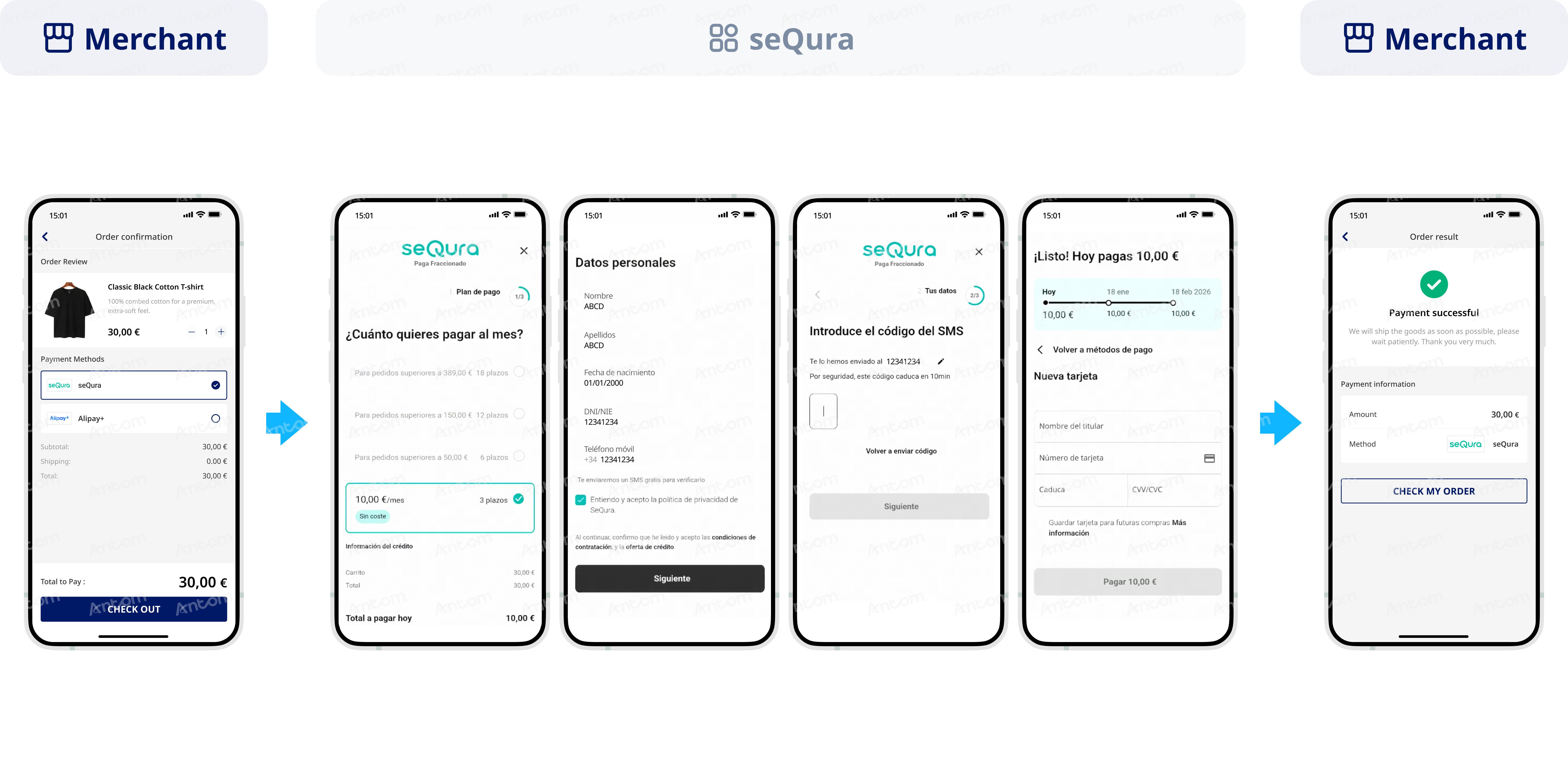
After the merchant server obtains the payment continuation URL returned by Antom, follow the steps detailed in Step 3: Get the payment continuation URL to pass this URL to your client. The merchant client then redirects to the seQura payment method page.
The following figure shows the effect of the seQura payment page:
Common questions
Q: Any special handling required on the paymentRedirectUrl parameter?
A: The default setting is HTTPS address, and special characters in the URL cannot be encoded, otherwise the payment flow will be abnormal.
Q: Does redirecting to the results page mean the payment was successful?
A: The result page cannot be used as the basis for judging whether the payment is successful. There may be the following scenarios that cause the failure of the redirection to the merchant page:
- After making a successful payment, the buyer may not be redirected to the result page due to network or other reasons.
- If the buyer has not completed the payment, the buyer may be redirected back to the merchant page via the payment method side.
- Antom will not specify information that represents the payment result in the paymentRedirectUrl parameter.
Step 4: Receive the asynchronous notification
Follow the steps detailed in Asynchronous notification of payment results to set the notification address for receiving payment results and handle the corresponding results.
After payments
After payments, you can perform the following actions:
Inquire payments
In addition to the asynchronous notification function to obtain the buyer's payment results, you can also actively query the service to obtain the corresponding results. You can call inquiyPayment API, you can use paymentRequestId query payment status. Follow the steps detailed in Inquire about the results.
Cancellation
The seQura payment method does not support cancellation. Use Refund to return the amount paid.
Refund
To learn about Antom refund rules and how to initiate a refund for a successful transaction, see Refund for more information.
Reconciliation
After the transaction is completed, use the financial reports provided by Antom for reconciliation. For more information on how to reconcile and the settlement rules of Antom, refer to Reconciliation.