
Overview
Antom online and in-store payment products offer a set of APIs that provide the ability to integrate with Antom. You can use the POST method to send HTTPS requests and receive responses accordingly.
The following section introduces the message structure and the end-to-end message transmission workflow.
Versioning
The current API version is v2. The version is specified in the URL. For example, https://host/openapi/v2/payments/pay.
Message structure
Before you make any payments, it is important to understand how Antom APIs work and how requests and responses are structured. This section presents general information (such as message structure and message transmission workflow) of online messages between your system and Antom. A message refers to the request message or the response message.
Request structure
The following figure illustrates the request message structure:
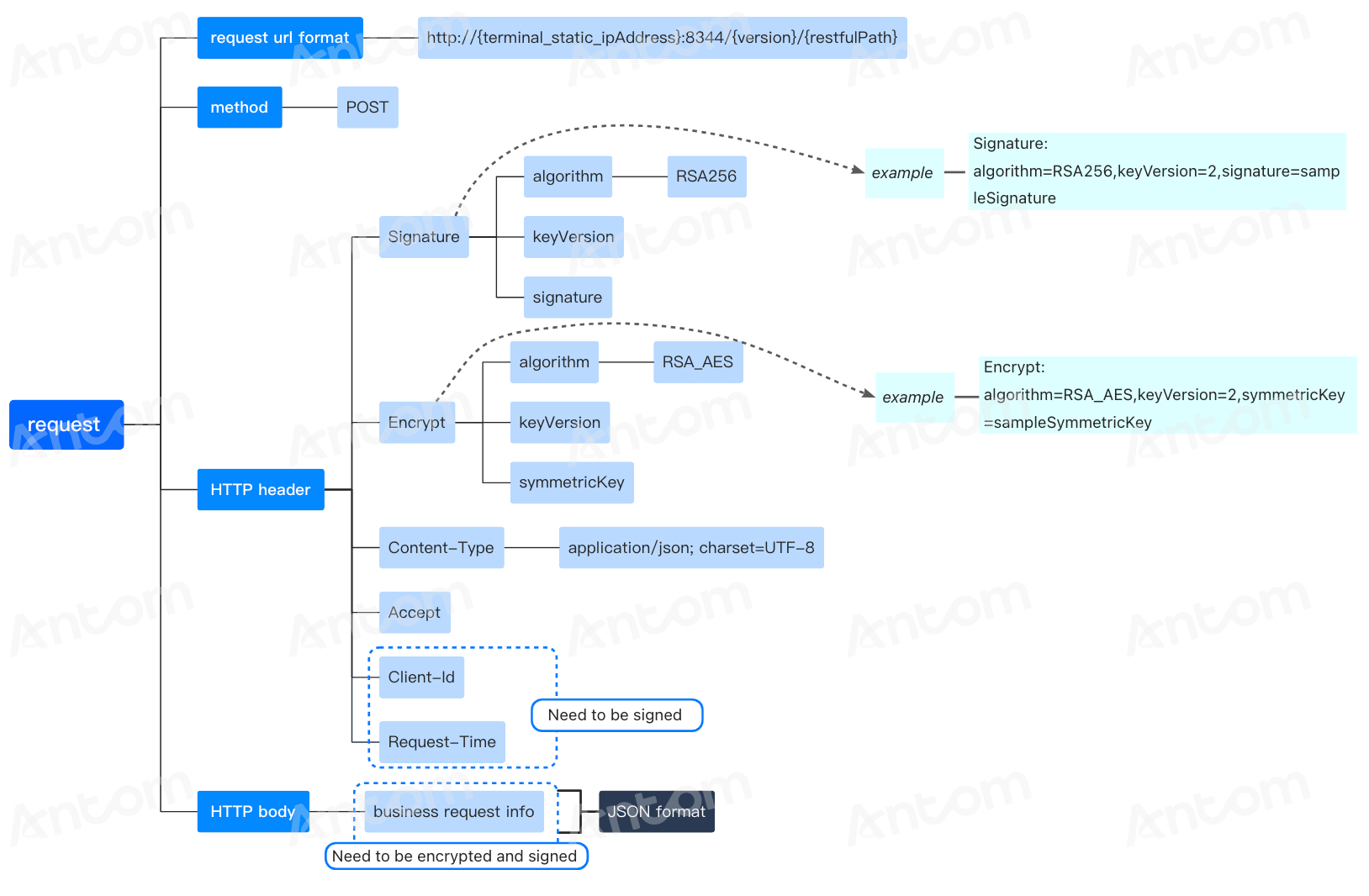
Figure 1. Request structure
HTTPS method
POST
Request header
The request header mainly contains the following fields.
Note: Field names are case-insensitive.
Header field | Required | Description | Code sample |
Signature | Yes | Contains key-value pairs that are separated by comma (,). Each key-value pair is an equation, which is a key joined with its value with an equal sign (=). The following keys can be configured:
|
|
Encrypt | Yes | Uses keys to transform plaintext into ciphertext through an encryption algorithm which can be transmitted securely.
|
|
Content-Type | Yes | Indicates the media type of the body of the request, in which, charset is used for generating/validating a signature. |
|
Client-Id | Yes | Used to identify a client and is associated with the keys that are used for the signature.
|
|
Request-Time | Yes | Specifies the timestamp of when the request is sent, as defined by ISO8601.
|
|
Accept | No | Used by the client to inform the server of which content types the client can handle. To specify the value of this field, enter MIME content types and use commas to separate each type.
|
|
Request body
The request body contains the detailed request information in JSON format. Fields enclosed in the request body vary depending on services. The request body must contain the following fields:
Field | Type | Required | Description | Sample |
| extendInfo | String | Yes | Extended information field for the merchant to pass custom data. | copy |
For more information, see the specific API specification document.
Response structure
The following figure illustrates the response structure:
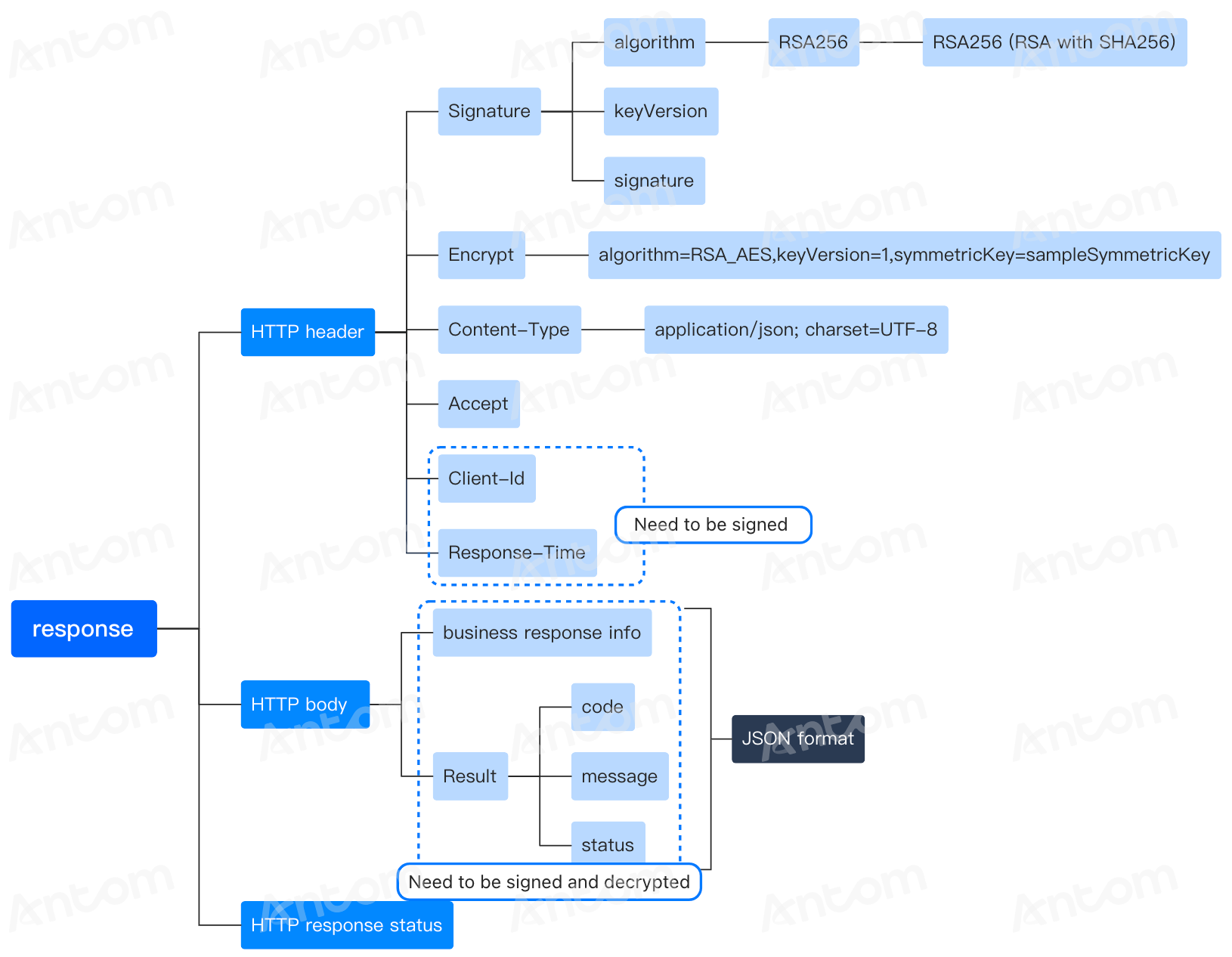
Figure 2. Response structure
Response header
The response header carries the information about the response, mainly containing the following fields.
Note: Field names are case-insensitive.
Header field | Required | Description | Code sample |
Signature | Yes | Contains key-value pairs that are separated by comma (,). Each key-value pair is an equation, which is a key joined with its value with an equal sign (=). The following keys can be configured:
|
|
Encrypt | Yes | Uses keys to transform plaintext into ciphertext through an encryption algorithm which can be transmitted securely.
|
|
Content-Type | Yes | Indicates the media type of the body of the request, in which, charset is used for generating/validating a signature. |
|
Client-Id | Yes | Used to identify a client and is associated with the keys that are used for the signature.
|
|
Request-Time | Yes | Specifies the timestamp of when the request is sent, as defined by ISO8601.
|
|
Response body
The response body contains the information responding to the client. Fields in this section vary depending on services. However, the result field, which indicates the result of an API call, is always contained.
When the result status (resultStatus) is failed, the result code (resultCode) is an error code, the result message (resultMessage) is an error message, which is used for troubleshooting. For more information about how to resolve errors, see Result/Error codes in the specific API.
Field | Type | Required | Description |
resultStatus | String | No | Result status. Valid values are:
|
resultCode | String (64) | No | Result code. |
resultMessage | String (256) | No | Result message that describes the result code and status in details. |
Message transmission workflow
The whole interaction sequence is illustrated below:
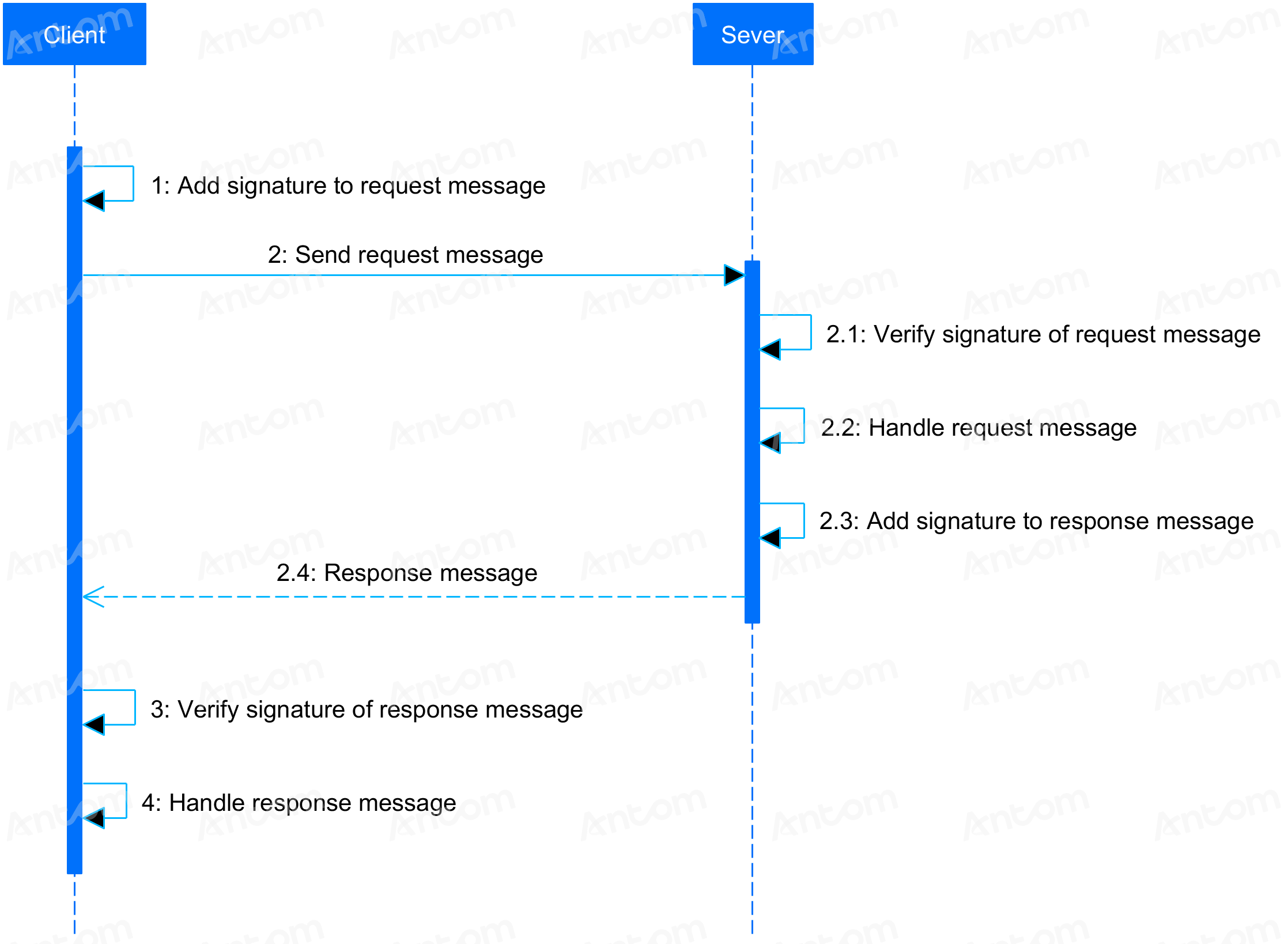
Figure 3. Message transmission workflow
Overall procedure
Follow the overall procedure to call an API.
Preparations
To prevent some potential errors that you might get in the response, consider the following factors:
- To prevent potential errors that you might get in the response, understand API idempotency.
- Encode a request that contains special characters.
1. Construct a request
Construct a request by complying with the request structure, for example, by adding the client-Id, request-time, signature, and other fields to the request header.
To ensure the message transmission security, perform the following security measures when constructing a request:
- Sign the request message. Message signing and signature validation are required for all requests and responses. For more information, see sign a request and validate the signature.
- Encode the request to prevent errors or ambiguity that might be caused by special characters enclosed in the request. For details, see Message encoding.
2. Send a request
You can send a request with your preferred platforms or tools, for example, Postman or cURL command.
3. Check the response
The response is usually returned in JSON or XML format. For details about the response, see the Response structure section. After you receive the response, validate the signature of the response.
4. Check the status code
The response data varies depending on the services. However, the result field, which indicates the result of an API call, is always contained. If an error occurs, an error response is returned, where the result object indicates the error code and error message for you to troubleshoot issues.
Idempotency
During the payment process, the POS system might send the same payment request (with the same paymentRequestId) multiple times due to reasons such as network timeouts or repeated submissions. Antom uses an idempotency key to ensure that the same payment request is processed only once. This effectively prevents duplicate deductions and ensures the security of the user's funds.
Processing rules:
- Payment is successful: If the payment corresponding to this paymentRequestId has been completed, it directly returns:
- resultStatus =
S(Success) - resultCode =
SUCCESS
- Payment in progress: If the payment corresponding to this paymentRequestId is still being processed asynchronously, it returns:
- resultStatus =
U(In progress) - resultCode =
PAYMENT_IN_PROGRESS
- Payment failed: If the payment corresponding to this paymentRequestId has been confirmed as failed, it returns:
- resultStatus =
F(Failed) - resultCode =
PAYMENT_FAIL
By identifying each payment request with a unique paymentRequestId and returning a clear response based on its final status, the reliability and user experience of the payment system are significantly improved.