
Refund
After the transaction is paid successfully, you can initiate a refund for a successfully paid transaction by calling the refund API.
The following figure is the workflow of refund:
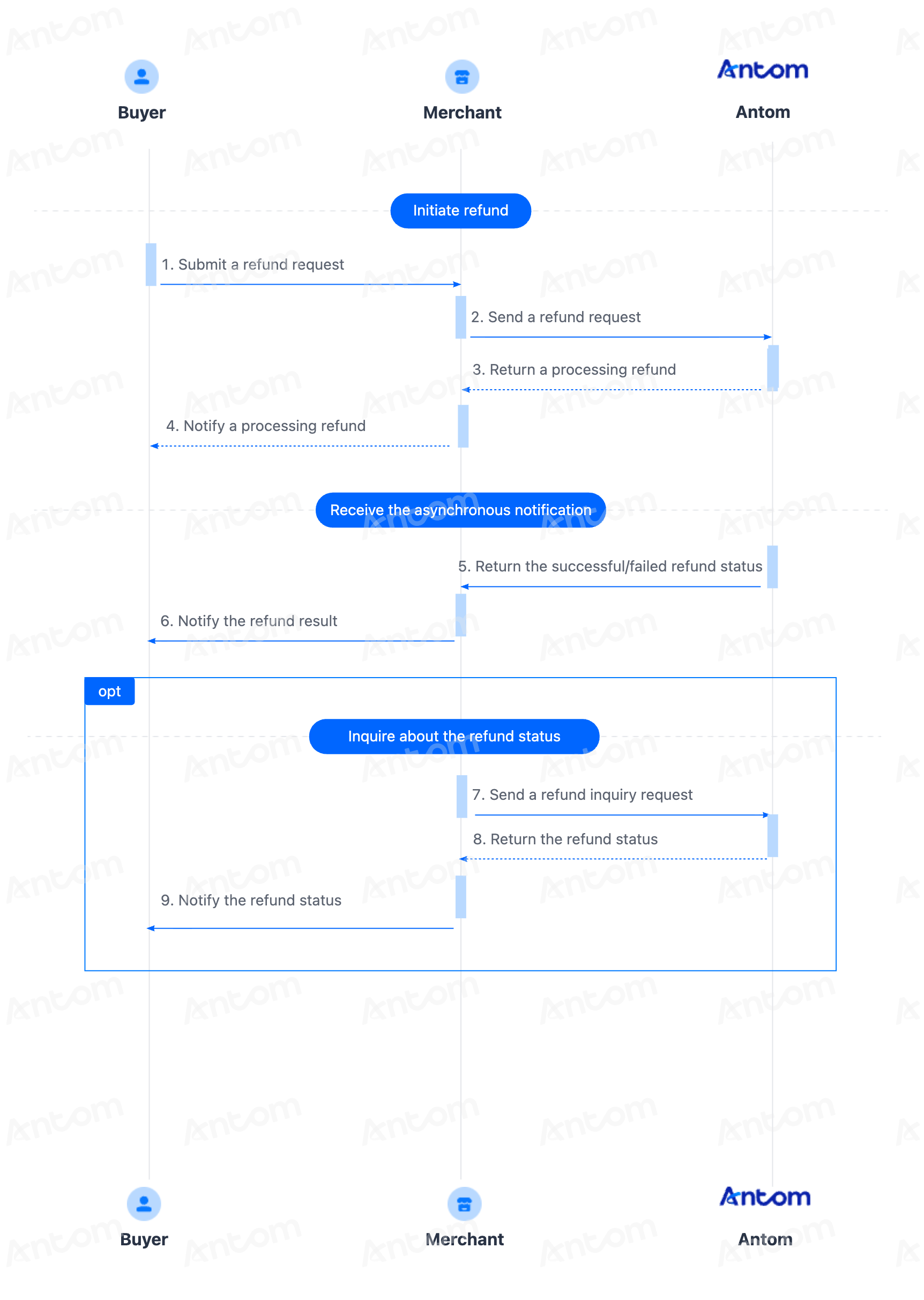
Integration steps
Start your integration by taking the following steps:
- Initiate a refund
- Receive the refund result
Step 1: Initiate a refund
Call the refund API to initiate a refund request. The following shows the sample code of a refund request:
{
  "paymentId": "20181129190741010007000000XXXX",
  "refundRequestId": "20181129190741020007000000XXXX",
  "refundAmount": {
    "value": "100",
    "currency": "USD"
  },
  "refundNotifyUrl": "https://www.baidu.com"
}
The following shows the sample code of a response:
{
  "result": {
    "resultCode": "SUCCESS",
    "resultStatus": "S",
    "resultMessage": "Success"
  },
  "refundAmount": {
    "value": "100",
    "currency": "USD"
  },
  "refundTime": "2020-10-10T12:01:01+08:30",
  "paymentId": "20181129190741010007000000XXXX",
  "refundRequestId": "20181129190741020007000000XXXX",
  "refundId": "40181129190741020007000000XXXX"
}
Step 2: Receive the refund result
Antom will send the corresponding refund result to you via server interaction. You can obtain the refund result using one of the following methods:
- Receive asynchronous notifications
- Inquire about the refund result
Set up asynchronous notifications
You can receive notifications from the notifyRefund API:
The following is the notification request sample code:
{
  "notifyType": "REFUND_RESULT",
  "refundAmount": {
    "currency": "HKD",
    "value": "10000"
  },
  "refundId": "2021080419401080130018866020092XXXX",
  "refundRequestId": "amsdemorefund_zhangyikai_zyk_20210804_165236_931",
  "refundStatus": "SUCCESS",
  "refundTime": "2021-08-04T01:52:37-07:00",
  "result": {
    "resultCode": "SUCCESS",
    "resultMessage": "Success",
    "resultStatus": "S"
  }
If you receive an asynchronous notification from Antom, you are required to return the response in the Sample code format, but you do not need to countersign the response.
You need to verify the signature of the payment notification sent by Antom. How to verify the signature of the notification and make a response to the notification, see Process the notification.
Whether the refund is successful or not, each notification request must be responded to in the format specified below:
{
  "result": {
    "resultCode": "SUCCESS",
    "resultStatus": "S",
    "resultMessage": "Success"
  }
}
Inquire about refunds
In addition to obtaining the refund result through the asynchronous notification, you can also inquire about the refund status by calling the inquiryRefund API using the refundRequestId from the refund request.
The following shows the sample code of a refund inquiry request:
{
    "refundRequestId": "REQUEST_20240612202258994"
}
The following code shows an example of a response:
{
  "refundAmount": {
    "currency": "HKD",
    "value": "10000"
  },
  "refundId": "2021080419401080130018866020092XXXX",
  "refundRequestId": "amsdemorefund_zhangyikai_zyk_20210804_165236_931",
  "refundStatus": "SUCCESS",
  "refundTime": "2021-08-04T01:52:37-07:00",
  "result": {
    "resultCode": "SUCCESS",
    "resultMessage": "Success",
    "resultStatus": "S"
  }
}
The table below shows the possible values of refundStatus returned in the response, please handle the result according to the guidance provided:
refundStatus | Message | Further action |
| Refund is successful. | No further action is needed. |
| Refund failed. | Please retry with a new refundRequestId. If the issue persists, contact Antom Technical Support. |
| Refund is being processed. | Please continue to inquire about the refund status until a final result is obtained or a refund asynchronous notification is received. |